


Participant
October 30, 2017
Answered

Invisible Elements not shown on Design View

  • October 30, 2017
  • 1 reply
  • 493 views

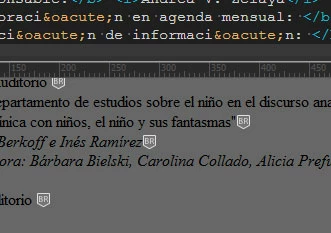
Hi, I've installed the last version of Dreamweaver CC, and I can't see the "Invisible elements" on the Desing View. I have checked all of the on the Preferences, but I discovered that icons are now white, so if the background page is white, I just can't see them.

I have to change the style background to see they are there, but this is not the way of working. Is there any way to change the color of the icons for the invisible elements?
This topic has been closed for replies.
Correct answer Divya_b_c

Hi Mario,

Sorry for the inconvenience. We have logged a bug internally and we will prioritize it for fix.

As a workaround you can change the Application theme from the below location and you will be able to see the icons.

Win: Edit Menu->Preferences->Interface. Choose a lighter app theme

Mac: Dreamweaver CC Menu -> Preferences -> Interface. Choose a lighter app theme.

Let us know if you need help with the above steps or with any other issue in DW

Thanks,

dbc

1 reply

Divya_b_cCorrect answer
Participating Frequently
October 30, 2017

Hi Mario,

Sorry for the inconvenience. We have logged a bug internally and we will prioritize it for fix.

As a workaround you can change the Application theme from the below location and you will be able to see the icons.

Win: Edit Menu->Preferences->Interface. Choose a lighter app theme

Mac: Dreamweaver CC Menu -> Preferences -> Interface. Choose a lighter app theme.

Let us know if you need help with the above steps or with any other issue in DW

Thanks,

dbc