


Participant
July 18, 2017
Answered

Is it possible to roll back to a more decent version of DW [was: I hate the latest DW]

  • July 18, 2017
  • 3 replies
  • 1240 views

I have been using DW for many, many years, probably something like 10 years.

I always loved it. I just recently changed laptop and decided to start using the subscription version of DW CC (previously I was still using one of the versions where you could just buy a licence).

This new version however I can't use. I list here my problems, maybe it's just me but I can't see how to fix them and I don't understand how anyone could accept to use this software:

- The code and design views get out of sync

- The I select an html tag, it selects the entire tag and its corresponding closing tag even though and the selection is blue which hides the cursor behind it which is also blue.

- Sometimes I copy text and it copies some other text from a random location

- I have an i7 generation 7 with SSD disk and 8MB ram and yet using Dreamweaver makes the CPU fan on all the time

All these things are driving me crazy and I can't find a way to fix them.

Is it possible to roll back to a more decent version of DW, I think 6 was a good one of the fist CC one?

    This topic has been closed for replies.
    Correct answer Nancy OShea

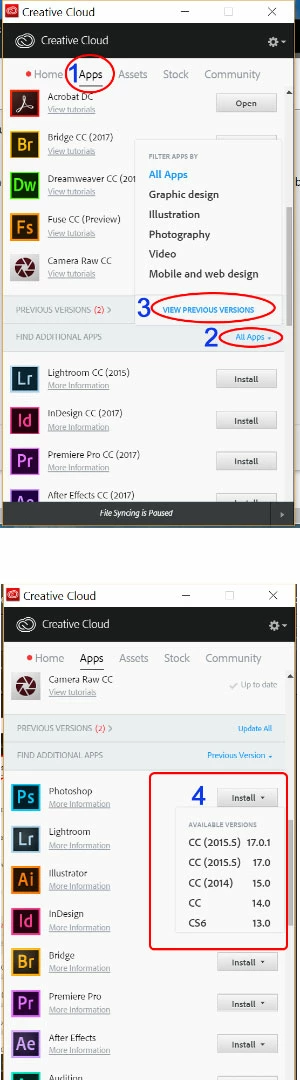
    From Creative Cloud Desktop App.

    Click on Apps > All Apps > VIEW PREVIOUS VERSIONS.  See screenshot.

    3 replies

    Niharika Jha
    Adobe Employee
    Adobe Employee
    July 21, 2017

    Hi,

    Thank You for the feedback.

    Can you please give us more details so that we can work on mitigating these issues:

    1.  The code and design views get out of sync

    - Can you confirm if you see some Linting errors? If you do then both Design and Live views might get out of sync.

    2. The I select an html tag, it selects the entire tag and its corresponding closing tag even though and the selection is blue which hides the cursor behind it which is also blue.

    - Which one of the themes are you using, all users have different color preferences and so to fulfill everyone's we have a lot of themes in Preferences->Interface to apply. You can try using those. We have received a lot of positive feedback on our available Code Themes.

    3. Sometimes I copy text and it copies some other text from a random location

    - We have some users who have been reporting this, but as per the latest update of Dw 17.5 we have not been able to see this in-house. If you have any set of files where this is happening or some reproducible steps, then that would be really helpful.

    4. I have an i7 generation 7 with SSD disk and 8MB ram and yet using Dreamweaver makes the CPU fan on all the time

    - We are aware of some background processes which are spiking CPU usage, and we are working on the fix. Hopefully this will get fixed in the later releases.

    Regards,

    Niharika Gupta

    Adobe Dreamweaver

    Known Participant
    July 21, 2017

    I think that the BIG problem is that after nearly a year since the launch of Muse Editor (aka DW 2017), Adobe didn't even understand because the people (especially the old customers) hate it and ask every time explanations about return back to the old versions.

    Adobe, please... listen me (not Ben, Nancy or other ACP users)... throws into the trash DW 2017 and return to work with an update (2018) using the previous stable version (CS6) as a starting point... or create a legacy configuration (with the same editor style colors, with the missing features as css apply source formatting, server behaviours, etc.).

    You can't pretend that the people that use Dreamweaver for over ten years to change immediately the way to work, you need to create  "incremental" updates.

    In this way, you may also be able to retrieve many old extensions developers (as WebAssist, Linecraft, etc.) and not only DMXzone (the extensions are the killer features of Dreamweaver).

    Otherwise you have to change the name of the software so that people that download it, know to use something completely new and still under development (DW 2017 is still a beta version).

    pziecina
    Legend
    July 21, 2017

    IronADDT

    you have made many posts about Dw and even though i do agree with some of your comments, i do not agree with them all.

    One thing would interest me though is, 'have you ever joined and actively taken part in the Dw pre-release program'?

    As someone who will never, ever join the Dw pre-release again, at least i have done so and have tried to change the direction Dw is moving, and get features incorporated, but being in a very small minority i achived nothing, i have at least tried though and have now given up on doing so. I can say that unless many more users such as yourself join the pre-release nothing will ever change.

    Most pre-release, (and many CAB) members are happy with the direction Dw development is taking, so unless you and many more who are not happy join, complaining in this forum is, (to quote the borg) futile.

    Preran
    Legend
    July 20, 2017

    Hi Alex,

    I apologize for your frustration. I will share your post with the team for their observations. Meanwhile, do use the solution provided by Nancy as a workaround solution.

    Thanks,

    Preran

    Participant
    July 20, 2017

    Thanks for the answers. I have installed DW CC 2014.1 and am happy again.

    I hope you fix the issues in CC 2017 in the next version. I think the UI in 2014.1 is way cleaner, the colours are better and the software is faster and more agile to work with.

    Nancy OShea
    Community Expert
    Nancy OSheaCommunity ExpertCorrect answer
    Community Expert
    July 18, 2017

    From Creative Cloud Desktop App.

    Click on Apps > All Apps > VIEW PREVIOUS VERSIONS.  See screenshot.

    Nancy O'Shea— Product User & Community Expert