
Participating Frequently
December 21, 2020
Answered

Is there a way to prevent dreamweaver from removing spaces after inserting elements and components?

  • December 21, 2020
  • 1 reply
  • 253 views

I'm teaching Dreamweaver and, i'm trying to help my kids keep their code organized and (important to them) separated.


When you insert either and HTML or bootstrap element, Dreamweaver deletes any empty lines between that element and whatever is next in the code.

Yes, yes, I know most people, myself included, prefer to not have extra spaces, but it would help my students get comfortable, not to mention stop them from not knowing where the hell they are in the code.

Please and thank you.
    This topic has been closed for replies.
    Correct answer Nancy OShea

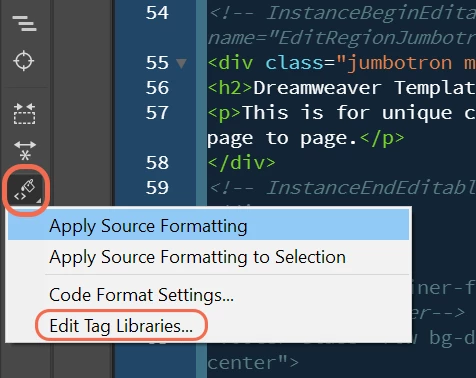
    Maybe it would help to add line breaks above and below tags from the Tag Library Editor. See screenshot.

    Add the BS component and then Apply Source Formatting. 


    Also encourage students to use code comments.

    <!--begin navbar-->
    <nav>
    yada, yada, yada...
    </nav>
    <!--/end navbar-->


    1 reply

    Nancy OShea
    Community Expert
    Nancy OSheaCommunity ExpertCorrect answer
    Community Expert
    December 22, 2020

    Maybe it would help to add line breaks above and below tags from the Tag Library Editor. See screenshot.

    Add the BS component and then Apply Source Formatting. 


    Also encourage students to use code comments.

    <!--begin navbar-->
    <nav>
    yada, yada, yada...
    </nav>
    <!--/end navbar-->


    Nancy O'Shea— Product User & Community Expert