Participant
December 31, 2019
Answered

Is there an option to clear Dreamweaver Recent files for CC 2020?

  • December 31, 2019
  • 2 replies
  • 4206 views

I am trying to clear out the recent files list, but see no such uption.

This topic has been closed for replies.
Correct answer BenPleysier

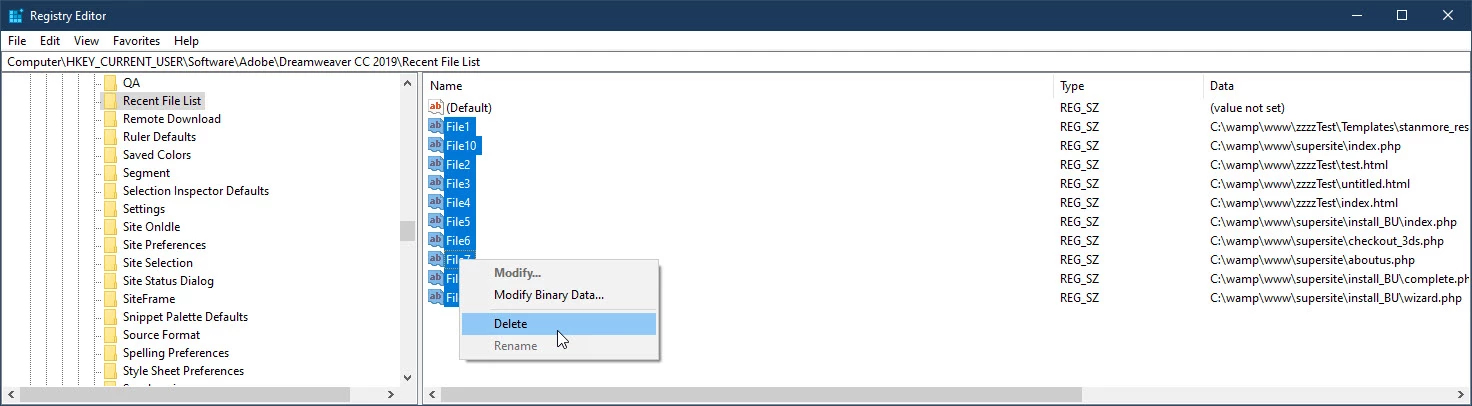
I am assuming that you are using Windows in which case open the Registry Editor and go to

HKEY_CURRENT_USER\Software\Adobe\Dreamweaver CC 2019\Recent File List

Leave the Default and remove the unwanted files
 

2 replies

BumMcFluff
Participant
April 6, 2022

Basically, delete from the registry without Dreamweaver being open.


Just watch this.

https://www.youtube.com/watch?v=JARbsac-qvI


B i r n o u
Legend
April 6, 2022

this post is three years old... @BenPleysier already gave this answer Dec 31, 2019

BenPleysier
Community Expert
BenPleysierCommunity ExpertCorrect answer
Community Expert
December 31, 2019

I am assuming that you are using Windows in which case open the Registry Editor and go to

HKEY_CURRENT_USER\Software\Adobe\Dreamweaver CC 2019\Recent File List

Leave the Default and remove the unwanted files


Wappler is the DMXzone-made Dreamweaver replacement and includes the best of their powerful extensions, as well as much more!
pellumbb77589221
Participating Frequently
December 31, 2020

Windiows writes the files back after deleting them! and next time you open up dreamwaver they are there!!! also they show up in the registry after few minutes or the very next time you open regedit up!  (Windows don't want to hand over keys to users! even though is your pc the operating system is owned microsoft and they been increasing their share!! ) Mac is worse as the only option there is to change preferences!!! (ity is not really a preference its anoyance)


pellumbb77589221
Participating Frequently
December 31, 2020

Solution which works for windows 10:

--------------------------------------------------------

Get rid of the open recent files folder rather as if you just delete files windows will write thouse back in the registry  the folder named recent file list will be written  back with new file history! If you now open the registry you will see new files history only(the old file history is gone!)