Participating Frequently
December 15, 2017
Answered

Is there some bug with the table feature in DW?

  • December 15, 2017
  • 4 replies
  • 779 views

I'm trying to do a table in my HTML code and it never positions the table rows as rows and instead positions them as inline columns instead, if that's not the issue when the text is outside the table itself. Is there some sort of known bug with the feature because I'm sorry, but I should not have to waste my time trying to do something as simple as a table in an HTML document.  Its absolutely stupid.

This is what I have (multiple rows in one column:

<table>

<tbody>

  <tr>

   <td>

    <tr>Row 1</tr>

    <tr>Row 2</tr>

    <tr>Row 3</tr>

    <tr>Row 4</tr>

   </td>

  </tr>

</tbody>

</table>

...and this is the retarded thing I'm getting, the rows should be underneath each other, because in primary school, that's what I learned what rows are. If I learned that at 6, why cant the team at DW work that one out?

Row 1Row 2Row 3Row 4
This topic has been closed for replies.
Correct answer Nancy OShea

Why are you using tables for layout?  Is this for tabular data or an HTML email?

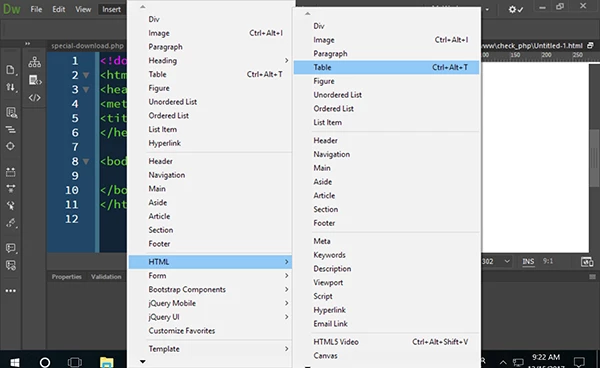
Start with a plain document.  Go to Insert > HTML > Table (Ctrl+Alt+T)

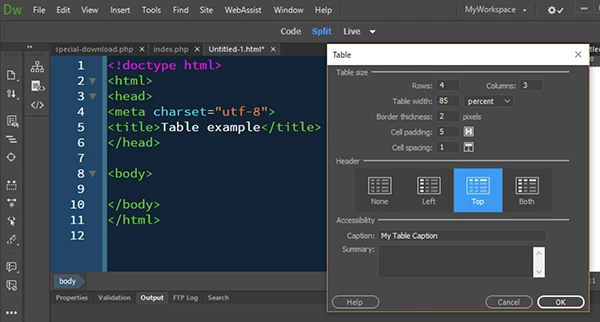
Enter desired number of rows, columns, width, etc... as shown in my screenshot.  Hit OK.

And this is my result:

!doctype html>

<html>

<head>

<meta charset="utf-8">

<title>Table example</title>

</head>

<body>

<table width="85%" border="2" cellspacing="1" cellpadding="5">

<caption>

My Table Caption

</caption>

<tbody>

<tr>

<th scope="col"> </th>

<th scope="col"> </th>

<th scope="col"> </th>

</tr>

<tr>

<td> </td>

<td> </td>

<td> </td>

</tr>

<tr>

<td> </td>

<td> </td>

<td> </td>

</tr>

<tr>

<td> </td>

<td> </td>

<td> </td>

</tr>

</tbody>

</table>

</body>

</html>

4 replies

Nancy OShea
Community Expert
Nancy OSheaCommunity ExpertCorrect answer
Community Expert
December 15, 2017

Why are you using tables for layout?  Is this for tabular data or an HTML email?

Start with a plain document.  Go to Insert > HTML > Table (Ctrl+Alt+T)

Enter desired number of rows, columns, width, etc... as shown in my screenshot.  Hit OK.

And this is my result:

!doctype html>

<html>

<head>

<meta charset="utf-8">

<title>Table example</title>

</head>

<body>

<table width="85%" border="2" cellspacing="1" cellpadding="5">

<caption>

My Table Caption

</caption>

<tbody>

<tr>

<th scope="col"> </th>

<th scope="col"> </th>

<th scope="col"> </th>

</tr>

<tr>

<td> </td>

<td> </td>

<td> </td>

</tr>

<tr>

<td> </td>

<td> </td>

<td> </td>

</tr>

<tr>

<td> </td>

<td> </td>

<td> </td>

</tr>

</tbody>

</table>

</body>

</html>

Nancy O'Shea— Product User & Community Expert
WolfShade
Legend
December 15, 2017

Here is the thing for me:  I can't tell from OP's original post if OP is using DW Insert > HTML > TABLE, or if OP manually typed the code.

"I'm trying to do a table in my HTML code.."  No mention of the method of creating the code.

I suspect OP manually wrote the code and forgot to place <td> between the <tr> and the content.

If my assumption is incorrect, please advise.

^ _ ^

Nancy OShea
Community Expert
Community Expert
December 15, 2017

If it's manually coded improperly, that's a user error and not a DW bug.  I'm guessing the OP tried to do something irregular or possibly the document contains other code errors which DW cannot resolve. 

Nancy O'Shea— Product User & Community Expert
WolfShade
Legend
December 15, 2017

Which version of DW are you using?

Are you using the "Insert" window, Common, Table, getting a dialog and adjusting configuration (ie, 1 row, 4 columns), and when you click OK, you get TR where there should be TD?

V/r,

^ _ ^

BenPleysier
Community Expert
Community Expert
December 15, 2017

A table is configured as per the following

table (<table>)

     row (<tr>)

          cells (<td>)

     row

          cells

See HTML Tables

Wappler is the DMXzone-made Dreamweaver replacement and includes the best of their powerful extensions, as well as much more!
B i r n o u
Legend
December 15, 2017

could you reformulate what is the bottom line... sorry I'm french and either the translator doesn't help me to figure out...

what I also miss understand is when you use <tr> directly in within <td> ???

<td> can only contains flows element so Common content models - HTML5

BenPleysier
Community Expert
Community Expert
December 15, 2017

... et c'est la chose retardée que j'obtiens, les rangées devraient être en dessous les unes des autres, parce qu'à l'école primaire, c'est ce que j'ai appris ce que sont les rangées. Si j'ai appris cela à 6 ans, pourquoi l'équipe de DW ne peut-elle pas s'en sortir?

Le pauvre gars n'a pas une emprise sur HTML

Wappler is the DMXzone-made Dreamweaver replacement and includes the best of their powerful extensions, as well as much more!
B i r n o u
Legend
December 15, 2017

Is that the coat of arms of Pleysier clan?

excellent ....