Known Participant
January 13, 2018
Answered

Is this an FTP problem ?

  • January 13, 2018
  • 1 reply
  • 1009 views

I've had Dreamweaver CS5.5 on my laptop for several years and recently bought a desktop, onto which I downloaded the same product.

I manually input FTP address / Username / Password etc., onto the new desktop, copying from the laptop settings.

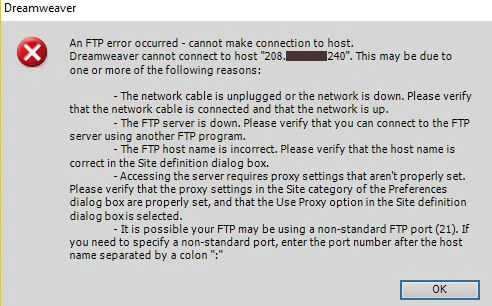
Upon "testing", the laptop is still fine but I get an FTP error on the desktop.

Where have I gone wrong ?

The only thing that is different is the name of the Local Site Folder on the two machines.

Thanks
This topic has been closed for replies.
Correct answer Nancy OShea

I use Filezilla all the time.  It's nothing to be afraid of. 

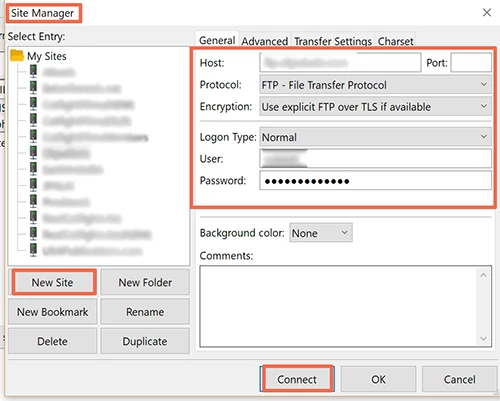
Click the link I posted above,  download, install.  Open the software and go to File > Site Manager.  Click the New Site button.   Enter your FTP log-in credentials.  Under the Advanced tab, enter your remote servers root directory -- public_html or whatever your host told you to use.

If it fails to connect, you know for certain the problem is not DW but something between your computer and your server.  

If it works, you have another way to FTP files while you trouble shoot the problem with DW.

Nancy

1 reply

Nancy OShea
Community Expert
Community Expert
January 13, 2018

Are you able to connect to your remote server with a dedicated FTP client like Filezilla?

Nancy O'Shea— Product User & Community Expert
pfmarconiAuthor
Known Participant
January 13, 2018

Thanks
I'll be honest Nancy - and I may appear stupid - but I have no idea how to do that and don't know if I might be causing more problems than I know.

Nancy OShea
Community Expert
Nancy OSheaCommunity ExpertCorrect answer
Community Expert
January 13, 2018

I use Filezilla all the time.  It's nothing to be afraid of. 

Click the link I posted above,  download, install.  Open the software and go to File > Site Manager.  Click the New Site button.   Enter your FTP log-in credentials.  Under the Advanced tab, enter your remote servers root directory -- public_html or whatever your host told you to use.

If it fails to connect, you know for certain the problem is not DW but something between your computer and your server.  

If it works, you have another way to FTP files while you trouble shoot the problem with DW.

Nancy

Nancy O'Shea— Product User & Community Expert