
azotez
Known Participant
November 23, 2016
Answered

It's kinda difficult to be polite while tiying to define the new Dreamweaver

  • November 23, 2016
  • 3 replies
  • 503 views

If I were not paying fot the CC I already would have trashed it.

  • File manager always freezes (for minutes)
  • Search panel always freezes (for minutes)
  • The new syntax hilighting is what every free product already have and is a step back

What's going on in there?
    This topic has been closed for replies.
    Correct answer Nancy OShea

    #3  I changed my code colors to a Brackets theme I found on Github.  Syntax highlighting works fine for me. 

    Re: Enable code coloring in Dreamweaver CC 2017

    #1 and #2.  I don't have any problems on Win10, 64-bit.  We need a lot more information about your set-up and settings to help you.

    Which OS?

    Your local site folder, is it on your primary hard drive or on a networked/external drive?

    Is File Sync turned on or off?

    Is automatic Sync Settings on or off?

    Do the lags occur with all files and all sites or just certain ones?

    Is your computer using energy saving hibernation/sleep mode?

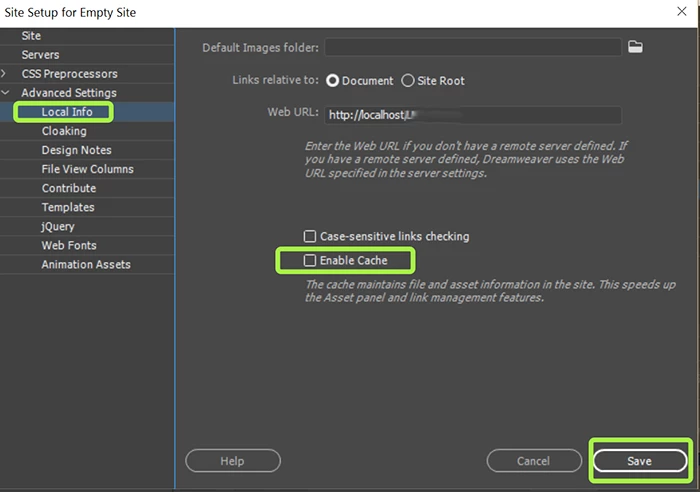
    Do you have Enable Cache turned on or off.

    Nancy

    3 replies

    azotez
    azotezAuthor
    Known Participant
    December 1, 2016

    Thanks Nancy,
    i reinstalled DW and then used the win key + shift + ctrl open trick to speed up the opening, but the file browser panel is still freezing sometimes..

    I don't have any Lavasoft software installed, but I'm connected to a couple of protected network resoruces and I wanted to work (still difficult to) on a remote folder of 20000+ files..
    That never gave me any problem with the previous version of Dreamweaver..I hope that a new update will solve the problem..

    Davide

    azotez
    azotezAuthor
    Known Participant
    November 28, 2016

    Thanks Nancy,

    but unfortunately..

    #3

    Brackets syntax higlithing is not the same thing at all.
    It's not just a matter of colors.. It's the logic that stands beside the problem (forms colored differently, etc..).

    #1 #2

    I wish I could send you more info (I'm working on Windows 7) but today, this is the actual situation...
    "Non risponde" means "Not answering"..

    Nancy OShea
    Community Expert
    Community Expert
    November 28, 2016

    Restore Preferences

    https://helpx.adobe.com/dreamweaver/kb/restore-preferences-dreamweaver-cs6-cc.html

    Also LavaSoft's Web Companion is a known conflict with certain Adobe Programs.  Uninstalling Lavasoft takes care of it.

    Nancy

    Nancy O'Shea— Product User & Community Expert
    Nancy OShea
    Community Expert
    Nancy OSheaCommunity ExpertCorrect answer
    Community Expert
    November 23, 2016

    #3  I changed my code colors to a Brackets theme I found on Github.  Syntax highlighting works fine for me. 

    Re: Enable code coloring in Dreamweaver CC 2017

    #1 and #2.  I don't have any problems on Win10, 64-bit.  We need a lot more information about your set-up and settings to help you.

    Which OS?

    Your local site folder, is it on your primary hard drive or on a networked/external drive?

    Is File Sync turned on or off?

    Is automatic Sync Settings on or off?

    Do the lags occur with all files and all sites or just certain ones?

    Is your computer using energy saving hibernation/sleep mode?

    Do you have Enable Cache turned on or off.

    Nancy

    Nancy O'Shea— Product User & Community Expert