cantey57311815
Participant
April 18, 2019
Answered

Javascript Style Change Not Working

  • April 18, 2019
  • 2 replies
  • 2110 views

Hello all,

I'm getting into WebDev. I learned some Javascript a year ago, and I'm trying to relearn now. I attempted this simple exercise from the online class I took last year; it's supposed to change the h1 color to pink using Javascript:

var h1 = document.querySelector("h1");

h1.style.color = "pink";

When I type this in, nothing happens. I looked at the console on the preview page and got this error message: "Failed to load resource: the server responded with a status of 404 (Not Found)"

I don't understand what is "not found" and why. I would appreciate any help you can offer. If you need clarification, I can provide more code and context.

Thanks in advance!

This topic has been closed for replies.
Correct answer Nancy OShea

A 404 error simply means the file is not found.

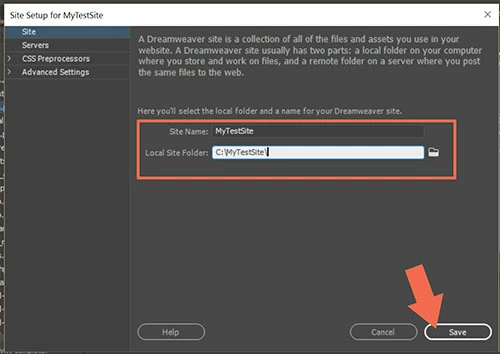
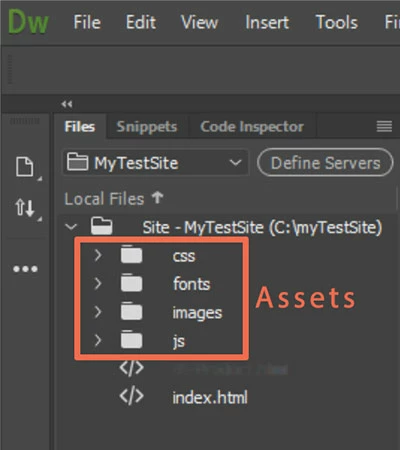
Do you have all your files and assets in a defined local site folder?  Example, C:\MyTestSite\

Files Panel (F8)

Be sure to upload all files and folders from local site to the remote server.

2 replies

Nancy OShea
Community Expert
Nancy OSheaCommunity ExpertCorrect answer
Community Expert
April 18, 2019

A 404 error simply means the file is not found.

Do you have all your files and assets in a defined local site folder?  Example, C:\MyTestSite\

Files Panel (F8)

Be sure to upload all files and folders from local site to the remote server.

Nancy O'Shea— Product User & Community Expert
B i r n o u
Legend
April 18, 2019

without seeing the way that you link the JS file to the HTML host it's difficult to see who is missing

just create only document HTML

<!doctype html>

<html>

<head>

<meta charset="utf-8">

<title>Document sans nom</title>

</head>

<body>

<h1>Title</h1>

<script>

    var h1 = document.querySelector("h1");

    h1.style.color = "pink";

</script>

</body>

</html>

if you don't add the script tag at the end of the document, you will need to wait that the doc is fully loaded before firing the script.

using a window.onload event

window.onload - Référence Web API | MDN