

Chaplain Dale
Inspiring
February 6, 2020
Question

Jquery tabbed panel header adjustment

  • February 6, 2020
  • 2 replies
  • 831 views

When I insert a Jquery tabbed panel the header where the tabs reside is way to large in the "y" direction.  I have tried to use the CSS Designer panel to adjust the header to no avail.  I just can't seem to find the adjustment anywhere.  A picture of my issue is below.  With Spry there was a tutorial on these adjustments.  

Thanks,
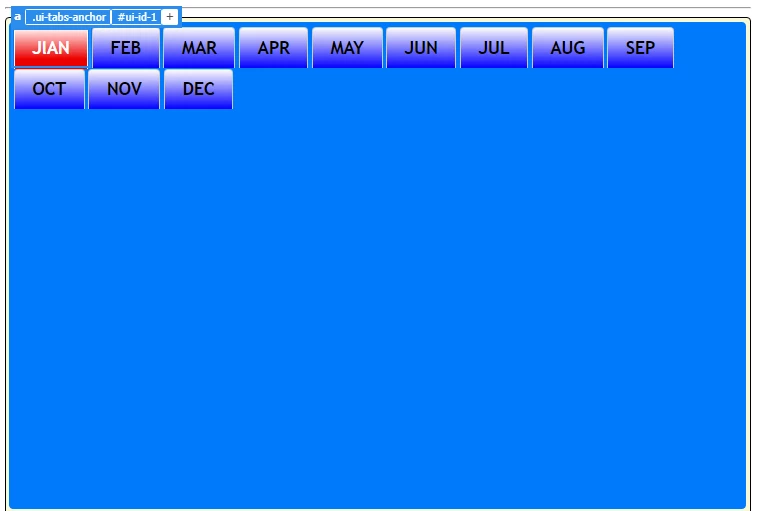
 

This topic has been closed for replies.

2 replies

Nancy OShea
Community Expert
Community Expert
February 20, 2020

 Not too sure what you mean by blue header.  Below is an example of jQuery UI Tabs with the Pepper Grinder theme.   By default the panels are only as big as content requires.


<!doctype html>
<html lang="en">
<head>
<meta charset="utf-8">
<title>jQuery UI Tabs</title>
<meta http-equiv="X-UA-Compatible" content="IE=edge">
<meta name="viewport" content="width=device-width, initial-scale=1">

<!--jQuery UI Theme, pepper-grinder-->
<link rel="stylesheet" href="https://code.jquery.com/ui/1.12.1/themes/pepper-grinder/jquery-ui.css">

<style>
body {background: darkgreen}
.parent {
width:50% !important; 
margin:56px auto}
</style>

</head>
<body>
<div class="parent">
<div id="tabs">
<ul>
<li><a href="#tabs-1">Tab 1</a></li>
<li><a href="#tabs-2">Tab 2</a></li>
<li><a href="#tabs-3">Tab 3</a></li>
<li><a href="#tabs-4">Tab 4</a></li>
<li><a href="#tabs-5">Tab 5</a></li>
<li><a href="#tabs-6">Tab 6</a></li>
</ul>
<div id="tabs-1">
<h3>Heading 3</h3>
<p>Proin elit arcu, rutrum commodo, vehicula tempus, commodo a, risus. Curabitur nec arcu. Donec sollicitudin mi sit amet mauris. Nam elementum quam ullamcorper ante. Etiam aliquet massa et lorem. Mauris dapibus lacus auctor risus. Aenean tempor ullamcorper leo. Vivamus sed magna quis ligula eleifend adipiscing. Duis orci. Aliquam sodales tortor vitae ipsum. Aliquam nulla. Duis aliquam molestie erat. Ut et mauris vel pede varius sollicitudin. Sed ut dolor nec orci tincidunt interdum. Phasellus ipsum. Nunc tristique tempus lectus.</p>
</div>
<div id="tabs-2">
<h3>Ordered List</h3>
<ol>
	<li>Item </li>
	<li>Item </li>
	<li>Item </li>
	<li>Item </li>
</ol>
</div>
<div id="tabs-3">
<h3>Unordered List</h3>
<ul>
<li>something here</li>
</ul>
</div>
<div id="tabs-4">
<h3>Heading 3</h3>
<p>Proin elit arcu, rutrum commodo, vehicula tempus, commodo a, risus.</p>
</div>

<div id="tabs-5">
<h4>Heading 4</h4>
<p>Proin elit arcu, rutrum commodo, vehicula tempus, commodo a, risus.</p>
</div>

<div id="tabs-6">
<h2>Heading 2</h2>
<p>Proin elit arcu, rutrum commodo, vehicula tempus, commodo a, risus.</p>
</div>
</div>
</div>

<!--jQuery core library--> 
<script src="https://code.jquery.com/jquery-3.2.1.min.js" integrity="sha256-hwg4gsxgFZhOsEEamdOYGBf13FyQuiTwlAQgxVSNgt4=" crossorigin="anonymous"></script> 
<!--jQuery UI--> 
<script src="https://code.jquery.com/ui/1.12.1/jquery-ui.min.js" integrity="sha256-VazP97ZCwtekAsvgPBSUwPFKdrwD3unUfSGVYrahUqU=" crossorigin="anonymous"></script> 
<script>
  $( function() {
    $( "#tabs" ).tabs();
  } );
  </script>
</body>
</html>
Nancy O'Shea— Product User & Community Expert
Nancy OShea
Community Expert
Community Expert
February 6, 2020

Wrap your Tabbed panels in a parent container styled to whatever width is required.   For expediency, this example contains inline CSS.  In production, you would put CSS in your stylesheet.  Adjust values to suit. 


<div class="parent" style="width:50%; margin:0 auto">

<!--TABBED PANELS GO HERE-->

</div>


Nancy O'Shea— Product User & Community Expert
Chaplain Dale
Inspiring
February 20, 2020

Nancy,

That doesn't work for me.  I still have that huge blue header.  When I use your code, it just reduces the width by 50%.  Thanks.

Jon Fritz
Community Expert
Community Expert
February 20, 2020

It's pretty much impossible to say exactly what's going on with your page, without seeing the code.

Could you copy and paste the entire code of your page, and any css attached, into a forum reply so we can take a look at what's causing your issue?

...or better yet, post a link to a test page on a website you control so we can see with our browsers what's going on?