


Participant
Dec 18, 2019 8:09 AM UTC
Answered

Jump to by click in Browser... // Springe zum Code beim Klicken im Browser...

// EN
The following question about Adobe Dreamweaver - I would like to jump to the HTML code DIRECTLY when clicking on an area in the browser preview - is this only possible via the live preview or also in the view with the browser in a separate window and Dreamweaver in another ...?

// DE
Folgende Frage zu Adobe Dreamweaver - ich würde gerne beim klicken auf einen Bereich in der Browser-Vorschau DIREKT auf den HTML Code springen - ist das nur über die Live-Vorschau möglich oder auch in der Ansicht bei der sich der Browser in einem separaten Fenster befindet und Dreamweaver in einem anderen...?

This topic is closed to new replies. Start a new post to keep the conversation going.
Nancy OShea
Nancy OSheaCorrect answer
Community Expert
Dec 19, 2019 12:53 AM UTC

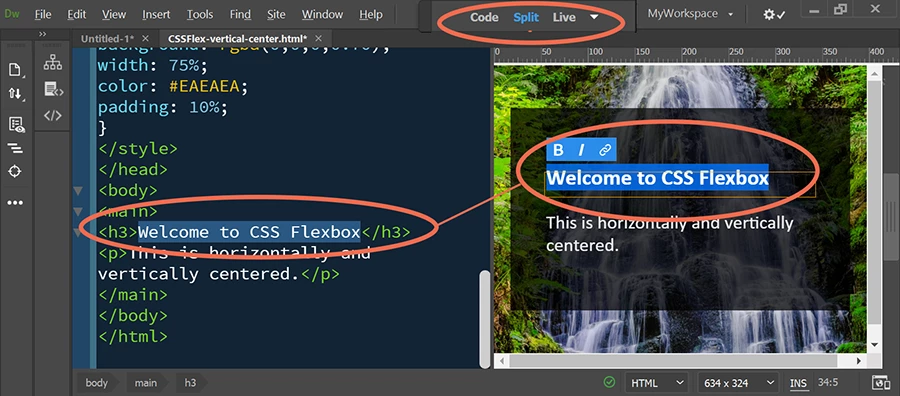
Real-Time Preview does not work that way.  Instead use Split view (Code & Live) side-by-side.  See screenshot.


Nancy O'Shea— Product User & Community Expert

3 replies

hans-g.
Legend
Dec 19, 2019 12:55 PM UTC

Hallo Tobias,


als Ergänzung hierzu:

Ich bin nicht sicher, aber sprichst Du von der Wiedergabe auf zwei Bildschirmen?

Dazu hatte ich vor einiger Zeit unter "How can we improve Adobe Dreamweaver?" das Thema "Divide the display of Dreamweaver files (instancing) onto two separate screens" (Link:

https://dreamweaver.uservoice.com/forums/379458-adobe-dreamweaver-ideas/suggestions/14909841-divide-the-display-of-dreamweaver-files-instancin

eingebracht. Lalita Nayal (Admin, Adobe Dreamweaver) hat mitgeteilt, dass er in die prerelease aufgenommen würde. Leider habe ich nichts mehr davon gehört. Vielleicht könntest Du (aber auch Nancy und Ben) nachfragen.

Auch ich werde natürlich "nachfassen".


Viele Grüße

Hans-Günter

Translate
BenPleysier
Community Expert
Community Expert
Dec 18, 2019 9:13 AM UTC

As I understand your question, you have dreameaver on one screen and a browser with your site on a second screen. If that is the case, there are two ways that you can view the code in a browser, namely

  • right click the page and choose view source code or similar
  • right click the page and choose inspect (Chrome) or inspect element (Firefox)


If this is not what you are looking for, please elaborate.

Translate
Wappler is the DMXzone-made Dreamweaver replacement and includes the best of their powerful extensions, as well as much more!
Nancy OShea
Community Expert
Nancy OSheaCommunity ExpertCorrect answer
Community Expert
Dec 19, 2019 12:53 AM UTC

Real-Time Preview does not work that way.  Instead use Split view (Code & Live) side-by-side.  See screenshot.


Translate
Nancy O'Shea— Product User & Community Expert