


Participant
June 19, 2017
Answered

LESS compilation fails on mounted NAS server volume

  • June 19, 2017
  • 3 replies
  • 324 views

I recently decided to move all my websites to an AFP mounted share on a local server (actually, a Western Digital MyCloud).  But since I did that a couple days ago, I'm unable to compile any LESS files.  I can open them and edit them, but when I save them (which is when Dreamweaver usually compiles them and saves them), I get the following error:
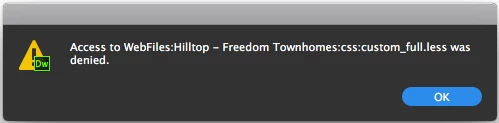
If I move the website files to a local hard drive or a hard drive directly connected to the computer, the files compile fine, but they fail to compile when the website files reside on a mounted shared volume (using AFP or SMB, it doesn't matter).  I'm experiencing this error on a Mac.

Is there a workaround or fix for this?

Bernardo

This topic has been closed for replies.
Correct answer pziecina

adsfasdfasdffasdds  wrote

I'm surprised in this day and age that you would question whether this is a supported workflow or not.  It would seem to me that in many cases this would actually be a preferred workflow (for the security of the data, backups, etc.).

I have to use remote drives extensively in my workflow, and have found that Dw has serious problems when the site and all files are not on the local drive, (just one of the reasons i can no longer use Dw).

I did file a feature request a few years ago for Dw to support such set-ups that are used by teams. I have not checked how Dw works when using its built in git support in a team environment, but it may be worth checking if that works how you wish, by defining your sites git repository on the nas server, (i don't think it will work, but if it does let me know).

The only other option i can suggest is for you to file a feature request, (under 'Help' menu) and add your support for better Dw support in such workflows.

3 replies

pziecina
Legend
June 20, 2017

To add to the replys,

Is your nas drive defined in your site set-up, (site definition) as Dw will look at the defined site drive for saving a file. Also check that Dw's site set-up has not set the nas drive as a remote server, as Dw does often have problems when trying to edit/save files to a remote server.

I have not used a nas drive on a mac, but follow Bens suggestion also, as the first time i used a 'local' nas server the file permissions for the folder i wished to use, were set to read only, but other folders were set to read/write, (don't know why that happened).

BenPleysier
Community Expert
Community Expert
June 20, 2017

I do not have a Mac so I have to guess.

Could it be a matter of permission? This is an old article but it should still be relevant How to Set File Permissions in Mac OS X | Macinstruct

Wappler is the DMXzone-made Dreamweaver replacement and includes the best of their powerful extensions, as well as much more!
Preran
Legend
June 20, 2017

I am not sure if there is a workaround solution to what you are doing because this doesn't look like a supported workflow to me. I am hoping that the community probably has an answer that I do not know of.

Thanks,

Preran

Participant
June 20, 2017

I'm confused when you say a "supported workflow".  You mean to tell me that the only supported workflow is for me to store my site files in a local hard drive?  What if I'm looking to access those files in an office environment with multiple computers?  Or I choose to store the files in a local file server rather than directly on my computer.

All I'm doing that may seem unorthodox (although I don't know why) is store my files in a MyCloud drive in my local network rather than on the computer locally.  The drive is mounted on my computer JUST as if it was a shared volume from another computer.

I'm surprised in this day and age that you would question whether this is a supported workflow or not.  It would seem to me that in many cases this would actually be a preferred workflow (for the security of the data, backups, etc.).

Bernardo

pziecina
pziecinaCorrect answer
Legend
June 20, 2017

adsfasdfasdffasdds  wrote

I'm surprised in this day and age that you would question whether this is a supported workflow or not.  It would seem to me that in many cases this would actually be a preferred workflow (for the security of the data, backups, etc.).

I have to use remote drives extensively in my workflow, and have found that Dw has serious problems when the site and all files are not on the local drive, (just one of the reasons i can no longer use Dw).

I did file a feature request a few years ago for Dw to support such set-ups that are used by teams. I have not checked how Dw works when using its built in git support in a team environment, but it may be worth checking if that works how you wish, by defining your sites git repository on the nas server, (i don't think it will work, but if it does let me know).

The only other option i can suggest is for you to file a feature request, (under 'Help' menu) and add your support for better Dw support in such workflows.