



Question
Line breaks <br> will prevent selecting text
When I have a simple HTML page containing a <br> tag it becomes difficult to select or edit the text on all following lines, it is as though the editor thinks there is an extra space somewhere.
When I double click a word to select it, this happens:
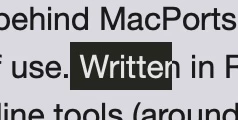
This is in Dreamweaver 2021 on macOS monterey in Design view.
If I delete the <br> from the previous line, I can then edit normally and afterwards replace the <br>, but that is a very clunky way to work.
Editing works normally in live view, I remember years ago this bug appeared in live view and the solution was to just use design view, now it seems they have fixed live view but broken Design view.
 AdChoices