Participant
September 7, 2018
Answered

Line Breaks in Selection

  • September 7, 2018
  • 1 reply
  • 463 views

Hi all.

I have just updated fro DW 2015 to DW 2018.

In 2015 you could select a large body of plain txt and via the "Selection" option under the R Click you could get it to put a line break at the end of each line in the selected Txt.

This does not seem to be available in 2018.

If it's still there can someone point me to it please.

Kia Kaha.

Graham

This topic has been closed for replies.
Correct answer Nancy OShea

On smaller viewports, those <br> tags would fall in random places resulting in a mess.   It's much better to place text inside <p> or <h...> tags for better semantic structure, don't you think?

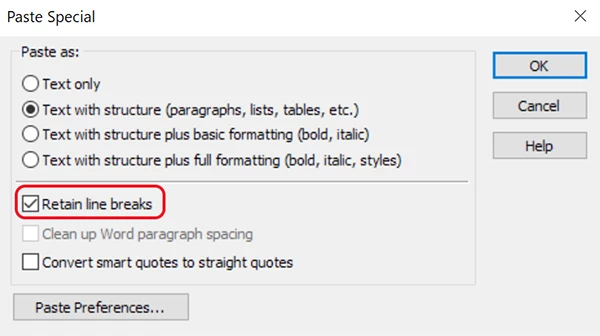
But to answer your question, use Edit > Paste Special.   See screenshot.

1 reply

Nancy OShea
Community Expert
Nancy OSheaCommunity ExpertCorrect answer
Community Expert
September 7, 2018

On smaller viewports, those <br> tags would fall in random places resulting in a mess.   It's much better to place text inside <p> or <h...> tags for better semantic structure, don't you think?

But to answer your question, use Edit > Paste Special.   See screenshot.

Nancy O'Shea— Product User & Community Expert
B i r n o u
Legend
September 9, 2018

https://forums.adobe.com/people/Nancy+OShea  a écrit

On smaller viewports, those <br> tags would fall in random places resulting in a mess.   It's much better to place text inside <p> or <h...> tags for better semantic structure, don't you think?

Personally, I am quite fussy about the text, its formatting and content, so I use and recommend the use of BR, which has structurally its full meaning within the P

if this causes a visual problem on some mobile devices, there is still the use of CSS to play with it or even hide it as br { display:none; }