


sydneym34533840
Participant
March 19, 2017
Answered

Link is linking to my flashdrive instead of a website

  • March 19, 2017
  • 1 reply
  • 205 views

I am making a website for my college class with Dreamweaver CC. Yesterday I downloaded the Dw Free trial app on my Mac, and I am having trouble with links. For example, I want Dreamweaver to link to myfitnesspal.com when I type in MyFitnessPal, but it thinks it is linking to somewhere in my files instead of the website. I'm trying to just highlight the text and right click and get the box where you can just press link, but I can't get it to show up. I right click and a big long menu comes up instead of the simple bold or link box I need it to be. Why is it linking to somewhere in my documents instead of just a simple website I need it to go to?

Also when I try to press make link on it it automatically goes to my computer files and won't let me just type in a link. This index page proposal is due tomorrow in class so if you could get me some answers right away that would be great! Thanks.

    This topic has been closed for replies.
    Correct answer Nancy OShea

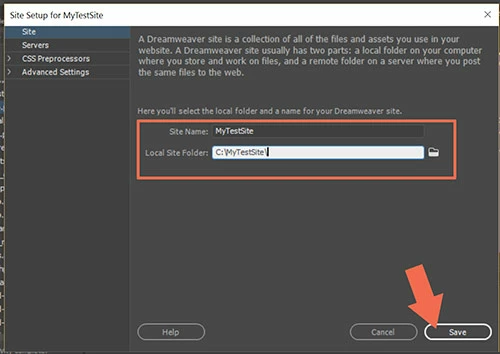
    First, are you working in a defined local site folder?  This is a critical first step, otherwise DW cannot manage assets and paths for you.

    Go to Site > New Site > and create a local site folder on your hard drive.

    Now, put your site assets into that named folder with your operating system's file manager.

    Example:

    C:\myTestSite

         images

         styles

         scripts

    DW works best with assets that are stored locally.

    If you must insert an asset that is remotely hosted, you must use the full URL including http://

    <img src="http://example.com/images/my_remote_image.jpg">

    When your project is completed, copy your entire local site folder including assets to your USB drive.

    Nancy

    1 reply

    Nancy OShea
    Community Expert
    Nancy OSheaCommunity ExpertCorrect answer
    Community Expert
    March 19, 2017

    First, are you working in a defined local site folder?  This is a critical first step, otherwise DW cannot manage assets and paths for you.

    Go to Site > New Site > and create a local site folder on your hard drive.

    Now, put your site assets into that named folder with your operating system's file manager.

    Example:

    C:\myTestSite

         images

         styles

         scripts

    DW works best with assets that are stored locally.

    If you must insert an asset that is remotely hosted, you must use the full URL including http://

    <img src="http://example.com/images/my_remote_image.jpg">

    When your project is completed, copy your entire local site folder including assets to your USB drive.

    Nancy

    Nancy O'Shea— Product User & Community Expert