


Participant
April 7, 2017
Question

Live/Design area on split screen blank

  • April 7, 2017
  • 3 replies
  • 1650 views

I am using Dreamweaver for my college classes right now. It was working fine then it stopped working all together correctly. I have Dreamweaver 2017, and when you have it in the split screen option, the top portion that supposed to show the design as you change things doesn't show anything except a blank screen that I can type in. It supposed to show the school website project that I am supposed to be building so I can see what it looks like without having to open up the browser all the time and design it blindly. How can I fix it to where it shows everything again? I have uninstalled and reinstalled Dreamweaver, switched to another computer and tried it. And even removed my files and readded them along with the styles sheet and it still does it. I have provided an image below of it.
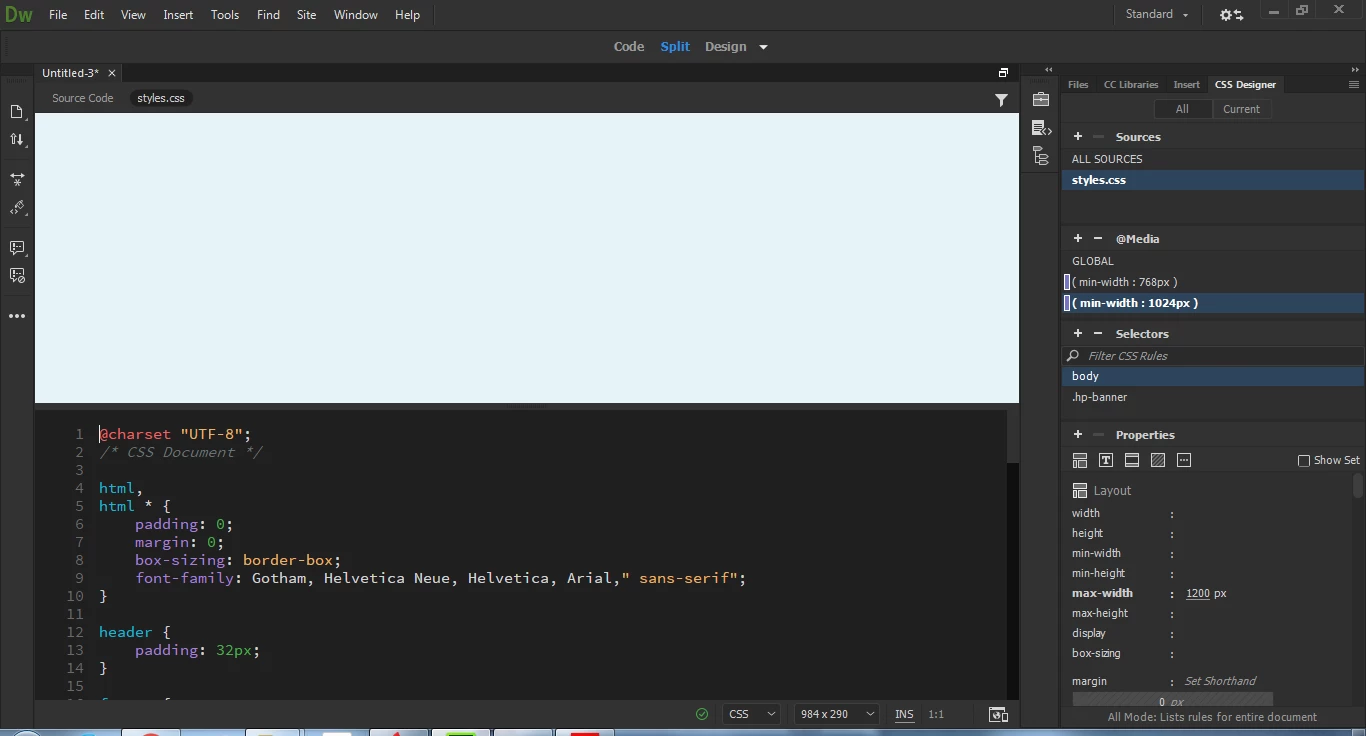
This topic has been closed for replies.

3 replies

Participant
April 9, 2017

This is the code I have typed in by hand:

<!doctype html>

<html><head>

<meta charset="utf-8">

<title>Lawn Care and Landscaping</title>

<!--Attach the styles.css just below this line-->

<link href="DES248-StudentStarterFiles/DES248-Lawncare_Site/styles.css" rel="stylesheet" type="text/css">

</head>

<body>

<header>

  <div class="row">

  <div class="col">

   <img src="DES248-StudentStarterFiles/DES248-Lawncare_Site/images/lawn-care-landscapingLogo.png" width="272" height="150" alt=""/>

   <nav class="style-nav">

  <ul style="list-style:none">

  <li><a href="#">Services</a></li>

  <li><a href="#">Gallery</a></li>

  <li><a href="#">The Crew</a></li>

  <li><a href="#">Contact Us</a></li>

  </ul>

   </nav>

   </div>

  </div>

</header>

  <main>

   <div class="row">

  <div class="col">

  <div class="hp-banner">

  <h3>Lawn Care & Landscaping</h3>

  <h1>No Yard Too Small or Large</h1>

  <a href="#" class="button">Read More</a>

  </div>

  </div>

   </div>

   <div class="row">

  <div class="col col-md-one-half">

  <div class="info-box-tan">

  <h2>Inspiration Gallery</h2>

  <p>Great ideas for your next landscaping project</p>

  <a href="" class="button">Read More</a>

  </div>

  </div>

  <div class="col col-md-one-half">

  <div class="info-box-dark">

  <h2>Meet the Crew</h2>

  <p>Professional arborists and lawn care specialists</p>

  <a href="" class="button">Read More</a>

  </div>

  </div>

   </div>

   <div class="row">

  <div class="col col-md-one-half col-lg-one-fourth"><img src="DES248-StudentStarterFiles/DES248-Lawncare_Site/images/homepage-image-1.jpg" width="480" height="478" alt=""/></div>

  <div class="col col-md-one-half col-lg-one-fourth"><img src="DES248-StudentStarterFiles/DES248-Lawncare_Site/images/homepage-image-2.jpg" width="480" height="478" alt=""/></div>

  <div class="col col-md-one-half col-lg-one-fourth"><img src="DES248-StudentStarterFiles/DES248-Lawncare_Site/images/homepage-image-3.jpg" width="480" height="480" alt=""/></div>

  <div class="col col-md-one-half col-lg-one-fourth"><img src="DES248-StudentStarterFiles/DES248-Lawncare_Site/images/homepage-image-4.jpg" width="480" height="480" alt=""/></div>

   </div>

  </main>

  <footer>

   <div class="row">

  <div class="col">

  <p class="footer-text">©2017 Lawn Care Landscaping. This website is a student project and does not represent a real company. All rights reserved by Independence University.</p>

  </div>

   </div>

  </footer>

</body></html>

This is the photo of what it supposed to look like for the desktop, smartphone and tablet views:

This is how it currently looks and I can't get it to change this is the desktop view:

Also I am supposed to create the mobile view and link each one of those navigation links to a page that I have to create.

Nancy OShea
Community Expert
Community Expert
April 9, 2017

I copied your HTML code into a new blank document and I can see Split View just fine.  Of course, I don't have your CSS or images.  So it's just unstyled text.   See screenshot.

Nancy O'Shea— Product User & Community Expert
Jon Fritz
Community Expert
Community Expert
April 7, 2017

It looks like a standard new blank page to me, it may be attached to the styles.css file, but that won't necessarily "show" you anything without html for those styles to be applied to...

Save your Untitled-3.html page into your Defined Site (obviously give it a more meaningful name)

     If you don't have a Site Definition, you need to do that first: Define a site (DW won't work correctly without a defined site being chosen in your Files Window)


Click "Source Code" at the top of the document window (you have styles.css chosen currently)

If you have html code written into the page, beyond the typical blank page code, that is supposed to be using styles from your .css file, verify you don't have any errors in your actual HTML by running the validator under File > Validate > Current Document (W3C)

If it's still not showing anything (and it's supposed to be) could you please share the html of the page?

Nancy OShea
Community Expert
Community Expert
April 7, 2017

Try switching to Source Code tab.  It's looks like you're viewing the dependent CSS file which is code view only.

Nancy

Nancy O'Shea— Product User & Community Expert