Participant
January 15, 2018
Answered

LiveView Guides missing

  • January 15, 2018
  • 3 replies
  • 853 views

Typically there are little blue dotted lines around each element (div, images, text, etc..) when working on a project in 'Live View' on Dreamweaver. I saved / closed a project. However when reopening all those guides are now missing. I cannot seem to figure out how to turn them back on. Any suggestions?

NORMAL:

CURRENT:

This topic has been closed for replies.
Correct answer Nancy OShea

DW  CC 2018 on Win10.

A new Bootstrap document from the Bootstrap Starter Templates.  No code errors.

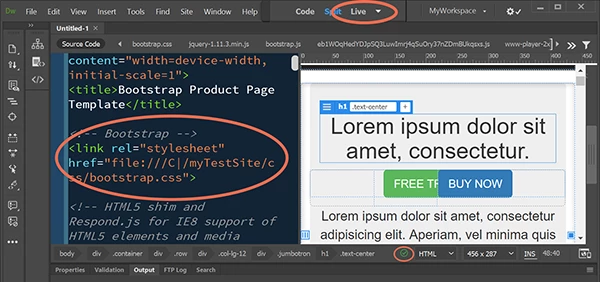
Source Code tab in Live View before saving document.

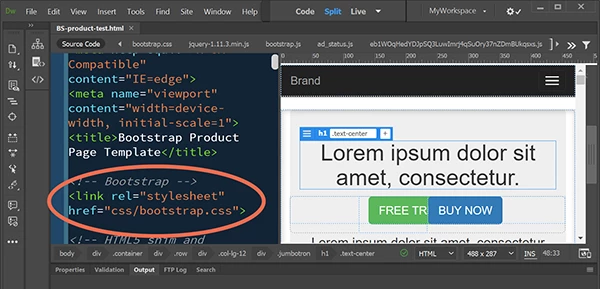
Source Code tab after saving document.

They look the same to me.

Nancy

3 replies

fosboss2Author
Participant
January 16, 2018

I am most certainly in Live View. I will attach new images.

Im running a Mac on HighSierra 10.13.2 using Dreamweaver CC2018 - Build 10136

If I switch to design view it appears completely different:

Jon Fritz
Community Expert
Community Expert
January 16, 2018

I've never seen Live View act that way before, maybe it's a new Bootstrap thing?

I have no idea what setting might be allowing that so I'll let someone who uses BS in DW possibly elaborate on that (though it does look like the normal items you'd see in Design View, minus the blue tabs).

I do see in your final image that you have some structural HTML errors within/related to the <header> tag. You'll definitely want to fix those by going to http://validator.w3.org/nu or File > Validate > Current Document (W3C). DW has always had issues with HTML errors and the newer program is a lot less forgiving than it used to be, so it might be worthwhile to check into that.

Edit: Yep, looks like some kind of initial set-up guides for BS pages. They disappear for me too after the initial save. Not sure if there's any way to turn them back on after that first save though.

Nancy OSheato the white concourse phone, Nancy to the white concourse phone

Nancy OShea
Community Expert
Nancy OSheaCommunity ExpertCorrect answer
Community Expert
January 16, 2018

DW  CC 2018 on Win10.

A new Bootstrap document from the Bootstrap Starter Templates.  No code errors.

Source Code tab in Live View before saving document.

Source Code tab after saving document.

They look the same to me.

Nancy

Nancy O'Shea— Product User & Community Expert
Jon Fritz
Community Expert
Community Expert
January 16, 2018

That first image is definitely Design View.

Live View won't show the outline (a solid blue one) until you select something that's editable.

To get back to Design View, make sure you have the Document Toolbar open (go to Window > Toolbars > place a check by Document) then click the small arrow to the right of Live to select Design from the context menu...

BenPleysier
Community Expert
Community Expert
January 15, 2018

I am assuming that you are on a Windows 10 system and are using Dreamweaver CC2018 build 10136.

In that case, the first image looks like a capture of your project in Design view and the second image a different capture in Live view.

Wappler is the DMXzone-made Dreamweaver replacement and includes the best of their powerful extensions, as well as much more!