


Inspiring
February 15, 2017
Answered

Local Browser View Differs from Online Browser

  • February 15, 2017
  • 2 replies
  • 4418 views

I'm struggling with getting a navigation menu SSI that I've created to appear as intended. I've spent hours using the "right-click a file, then choose 'Open in Browser'" approach while modifying the SSI file to my satisfaction.

Sadly, when I viewed the pages in Safari and Chrome, the menu is totally DIFFERENT from the local browser viewing! My screen shots tell the tale.

Here's what the menu on my localhost page looks like. . . Note that I've deleted the "June 13" menu button from my markup (shown in the last screen shot), but that deletion doesn't appear to have been made when viewing the page locally.
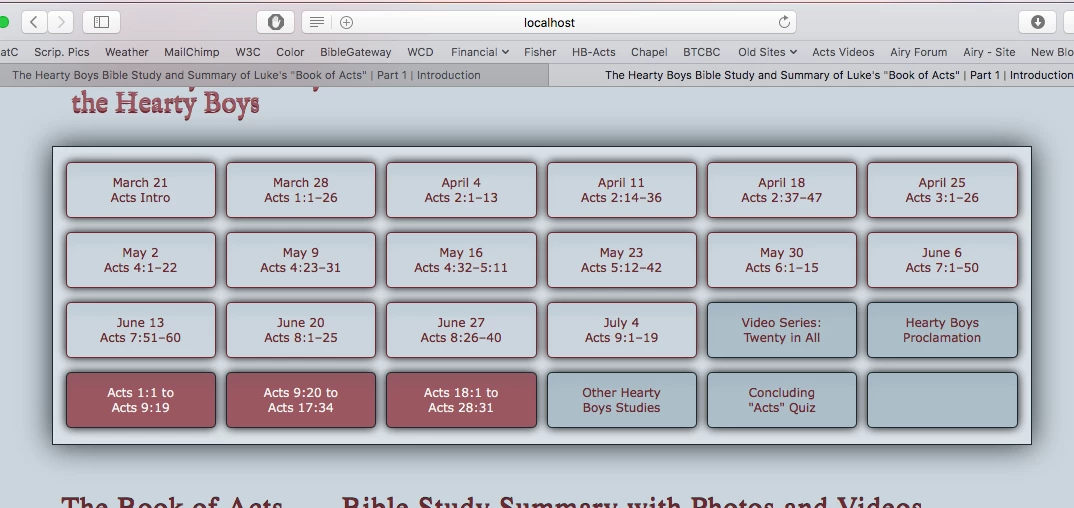
And here's the preferred menu as it looks like on Safari. . .

Here's the menu's markup: It appears properly online, but doesn't show correctly when viewed using localhost, as shown in my first screen shot.
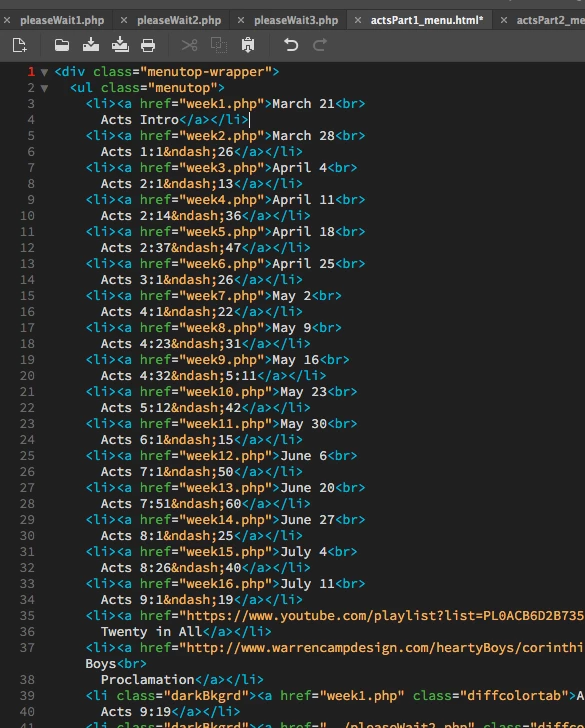
I'm new to PHP, SSI, and "Open in Browser using localhost. Please enlighten me.

Is there a reason that localhost doesn't update the modified SSI as it should? Is there something I need to do differently in order to use the local browser to view changed files in real time?

I want to be able to make changes that I can view locally without uploading my files prematurely to the world. But localhost doesn't appear to be working as expected.

Please help so I know what to do next. Thank you.

Warren

    This topic has been closed for replies.
    Correct answer Jon Fritz

    https://forums.adobe.com/people/Jon+Fritz+II  wrote

    Yep, Macs have the extra step in the folder structure, no idea why.

    So, Nancy and Jon, do either of you know conclusively which XAMPP folder my sites' files are to be housed?

    I'm prepared to clean house once I can be sure where the site files need to be stored.

    I await final approval and authorization.    (  ; - )


    You should be using xamppfiles/htdocs/yoursitename

    ...so all files for the site go into "yoursitename" and would then be accessible at http://localhost/yoursitename.

    Right now, it looks like you would be able to type simply "localhost" and get your site, which is fine, if you only ever build 1 site. If you intend to make multiple sites as time goes by, they really should be stored in a "yoursitename" folder that is different for each site.

    That "yoursitename" folder would also then be the Local Site Folder

    2 replies

    Jon Fritz
    Community Expert
    Community Expert
    February 15, 2017

    Have you cleared the browser cache yet?

    Community Expert
    February 15, 2017

    Since this is an include, I suspect there may be some caching involved.  Can you look in your localhost server settings to see if there is caching enabled and see if you can disable it?  If you are unsure where to look, can you post the localhost server software you are using and maybe we can help you find the preferences you are looking for.

    wcampAuthor
    Inspiring
    February 15, 2017

    Hello, Ben. I'm glad to meet you digitally! Thanks for your contribution.

    I'm unfamiliar with caching, as well as "local host server settings." Hopefully the following data will provide what you need to sort this out for me. If more is need, please ask again.

    The opening page to my site of seventeen completed pages is this:

    The Hearty Boys Bible Study and Summary of Luke's "Book of Acts" | Part 1 | Introduction

    And here's my SSI file for the problematic menu:

    http://www.warrencampdesign.com/heartyBoys/acts/part1/actsPart1_menu.html

    I'm on a Mac and using XAMPP for the localhost.

    If this might be a wrong-pathway issue, here's a screen shot of the XAMPP folder.

    Note: I've retained all the previously created .html pages in that "part1" folder (as shown above) in XAMPP's "htdocs" folder and on my server. I was afraid to delete them until this situation was resolved. If there's no reason to retain them any longer, please advise, and I'll toss them from my server's collection.

    Finally, in answer to Jon Fritz's follow-up inquiry ("Hello, Jon!"), I've cleared both browsers' cache files numerous times throughout the day yesterday, without resolution.

    Hope this helps. I'm eager to get much more familiar with SSIs and .php pages. I'm quite the newbee with respect to both, so thanks for your patience.

    Warren

    Jon Fritz
    Community Expert
    Community Expert
    February 15, 2017

    Server caching isn't turned on by default in XAMPP

    Are you using the server's htdocs folder as your local site folder in DW's site definition?

    The reason I ask is because if you are not using the htdocs as the local root folder in DW with your current file structure from the screenshot above, you may have 3 copies of the menu file at play here, and the one being used by the browser for previewing with the localhost address needs to be updated.

    One would be in the local site folder (whatever you named it on your hard drive) and used by DW, one on your remote server that you uploaded directly from DW (a duplicate of the local site folder version) and a final one would have been "uploaded" (though in reality just copied over) to your htdocs folder on the testing server.

    Since caching isn't turned on by default in XAMPP, it may simply be that you've forgotten to update the file on the local server. Your browser would be using local server for preview in Localhost which could be different from the site's local files.