
peggriffy
Inspiring
Dec 2, 2021 3:11 PM UTC
Answered

Local Files will not display

My local files will not display in the files panel in Dreamweaver.  The files are on the hard drive and have not moved from where they always have been.  Manage Sites is pointing to the correct file location. Thank you.
    This topic is closed to new replies. Start a new post to keep the conversation going.
    peggriffy
    peggriffyCorrect answer
    Inspiring
    Dec 10, 2021 10:42 PM UTC

    If you can't restore preferences, I suspect you don't have administrative privileges.

    Right-click on Dreamweaver 2021 icon from your Win Start Menu.

    Select More > Run as Administrator.


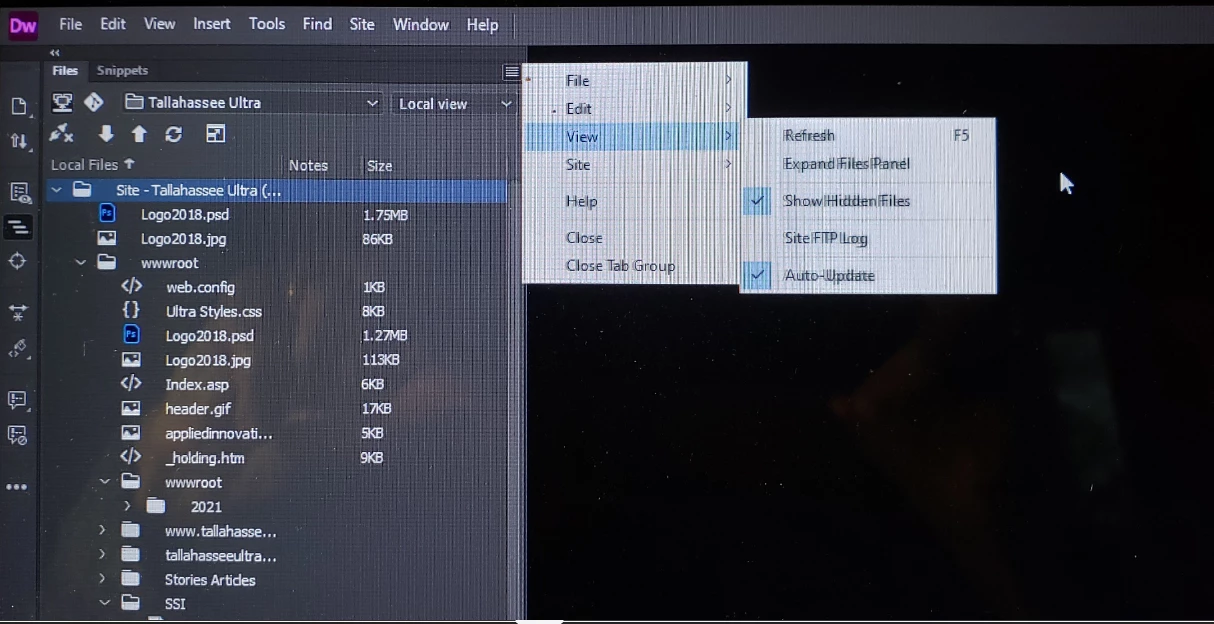
    Thank you again.  I just found the problem.  Files were hidden.  See screenshot.  As soon as I checked "Show Hidden Files" the local files re-appeared.  I appreciate all of your help.


    11 replies

    Nancy OShea
    Community Expert
    Community Expert
    Dec 2, 2021 7:24 PM UTC

    Perhaps you received an automatic update?  You can disable those from CC Desktop App Preferences.

    Go to Site > New Site and define your local site folder again.


    Translate
    Nancy O'Shea— Product User & Community Expert
    peggriffy
    peggriffyAuthor
    Inspiring
    Dec 8, 2021 11:15 PM UTC
    Thank you for your response. I followed your instructions and still cannot
    see my local files in Dreamweaver. I am unable to update my website. Any
    help you can give me would be appreciated.
    Translate
    BenPleysier
    Community Expert
    Community Expert
    Dec 9, 2021 2:35 AM UTC

    Expand the files panel.  Then show a screen shot here so that we can see what you are seeing.


    Translate
    Wappler is the DMXzone-made Dreamweaver replacement and includes the best of their powerful extensions, as well as much more!