
Known Participant
January 13, 2019
Answered

[Locked] Background file activity truncating

  • January 13, 2019
  • 1 reply
  • 3382 views

Starting just a short while ago in Dreamweaver CC 2019, the background file activity window has been truncating results at about 350 lines. Deletions, uploads, downloads are all affected. It will show the usual start of the operation, and the lines moving past in the window, but when it gets to roughly 350, one of the lines is truncated and no more lines are produced. The operation appears to complete, as evidenced by the scrolling file names under the site files window, but it's not showing the progress in the actual activity window like it always had before.

Aside from killing all my preferences (yet again), after reading that's not fixed it for others that have seen this in the past, is there a way to get that back again?


Windows 7 64bit, Dreamweaver CC 2019 (11193 build)
    This topic has been closed for replies.
    Correct answer Nancy OShea

    I also have had this problem for some time, over several versions. In addition, the number of files to be downloaded in the background activity window is grossly exaggerated. At this moment I am downloading approximately 15000 files from a folder. on my server. Currently Dreamweaver tells me that I have downloaded 5279 of 42,510!

    DW 2020 fully updated, windows 10.


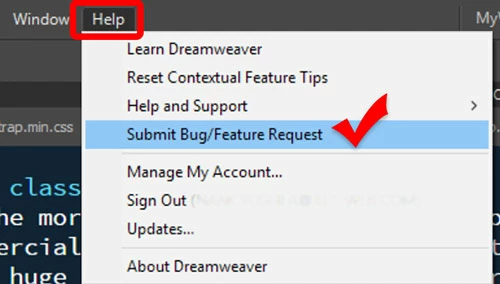
    Please submit Bug & Feature requests directly to the developers from your DW Help menu.

    Thank you.


    1 reply

    Nancy OShea
    Community Expert
    Community Expert
    January 13, 2019

    This sounds like a memory problem.  I don't mean to be obvious but have you restarted your computer?

    Nancy O'Shea— Product User & Community Expert
    wbearAuthor
    Known Participant
    January 13, 2019

    It's restarted daily, and I have 16GB of RAM. It's never done this with any prior version of DW, only 19. Even first thing in the morning, 350 lines or so is all it will allow.

    Nancy OShea
    Community Expert
    Community Expert
    January 13, 2019

    I don't pay much atention to backgrounf file activity in DW because I rarely upload more than a few files at a time.  It flashes on & off so fast, I hardly notice it.  

    The important question is if local files are reaching your server.   The best say to check is to expland your Files Panel and compare the Modified Date & Time stamps to ensure everything is the same on both sides.   See screenshot.

    If Files Panel doesn't display Modified date & time, right-click where it says Local Files and select Modified from the context menu.  See screenshot.

    Nancy O'Shea— Product User & Community Expert