Inspiring
Oct 9, 2021 10:28 AM UTC
Answered

[Locked] How to import websites from DW CS6 into DW 2021?

I'm at the import window and can't move forward. What must I do next?

Perhaps some file(s) have to renamed before I can import the docs from my DW CS6 website into DW 2021?  

This topic is closed to new replies. Start a new post to keep the conversation going.
Nancy OShea
Nancy OSheaCorrect answer
Community Expert
Oct 9, 2021 6:16 PM UTC

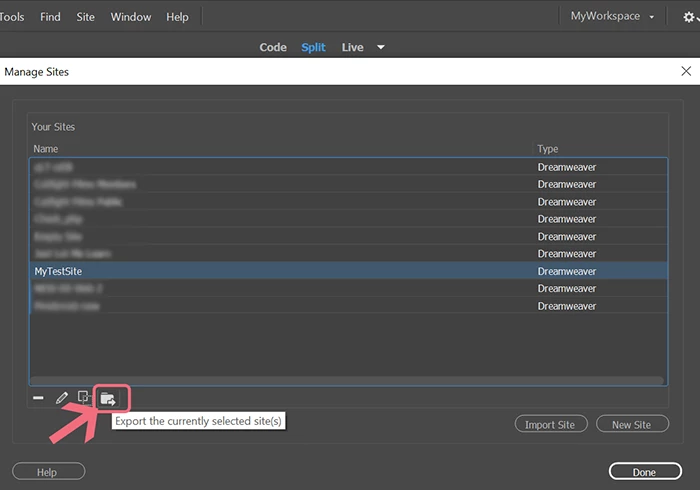
Did you export site settings from CS6 first?  That's the first step. 


Alternatively, you will need to manually create new settings in DW CC since you have no .ste file to import.


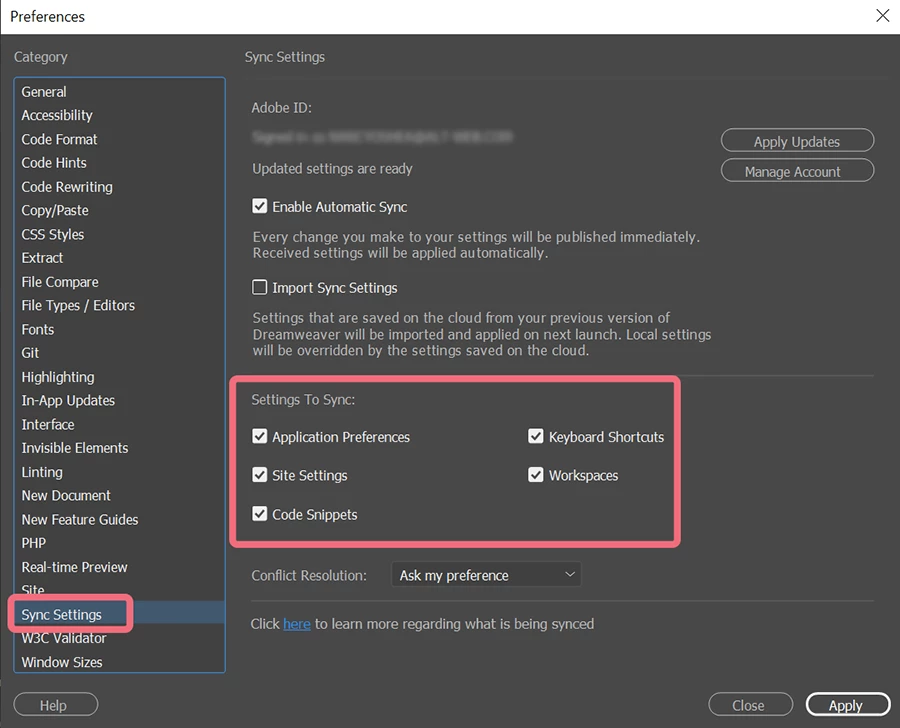
Once your site definitions are all set-up, be sure to sync settings to the cloud from Preferences.  In future migrations of DW CC, you can then import synced  settings from your cloud storage.  See screenshot.


Nancy O'Shea— Product User & Community Expert

44 replies

BenPleysier
Community Expert
Community Expert
Oct 24, 2021 10:37 AM UTC

I repeat what I said before


As one nearly octogenarian to a real octogenarian, the instructions shown in the link of my first reply, tell you everything. Here is the link once again.

https://helpx.adobe.com/dreamweaver/using/import-export-dreamweaver-site-settings.html


If you first read under Export your site settings and then view the first 40 seconds of this video

https://youtu.be/UE1cTzqAWVc


The second part of the video shows the Import site settings.


And that is it, you are ready to run with Dreamweaver 2021


Please do not tell me that I am going through a time wasting exercise while trying to help you.

Translate
Wappler is the DMXzone-made Dreamweaver replacement and includes the best of their powerful extensions, as well as much more!
Inspiring
Oct 24, 2021 7:46 PM UTC

Thank you.

Translate
B i r n o u
Legend
Oct 10, 2021 2:46 PM UTC

Well, I think that @BenPleysier is right... if you al ready have a website in DW CS6... that do mean, that exporting STE from CS6 and then import this STE from 2021... should do the job?

Translate
Nancy OShea
Community Expert
Community Expert
Oct 15, 2021 9:26 PM UTC

Bump.


Translate
Nancy O'Shea— Product User & Community Expert
Inspiring
Oct 15, 2021 9:47 PM UTC

What does that mean?  

All of this may seem quite obvious to you, but I haven't been able to even figure out how to download my DW CS6 site settings. I am not technical but yet have managed a code-generated website for over 20 years thanks to DW. All the recommendations I've received from the support community _ I do not question their correctness, but I've been unable to implement them.  At 80, I need a step-by-step explanation, including which menus to pull down, and a video would do the trick. Surprised Adobe doesn't have archived videos to handle such issues that could bi-pass technical jargon. Unless I can get this done, I will cancel my new subscription to DW 2021 and hobble along as best I can with DW CS6 and be unable to upgrade my OS  Hope you can help. Are there people available in downtown San Francisco who could actually come over and do the transfer on my computer. I'd be willing to pay for that service. 

Translate
Nancy OShea
Community Expert
Community Expert
Oct 9, 2021 8:07 PM UTC

We are assuming your local site folder is already on your computer hard drive e.g. C:\MySiteFolder\


Translate
Nancy O'Shea— Product User & Community Expert
B i r n o u
Legend
Oct 9, 2021 7:03 PM UTC

excuse me @BIRON Photos  if I'm wrong, but it seems to me that you would like to import your site (in fact all the files, folders and documents that compose it)... if that's it... the STE files only take care of the parameters of your site, as well at the local level, as at the server level.


so if they are the actual files you want to import... open Dreamweaver, and first of all (if it is not already done) create a site (Site > New Site) create a local folder on your hard drive.


from there two methods,


1 - either you recover your site from an archive, a backup, a hard disk... etc... and you manually copy the files in the freshly created local folder...


or


2 - if your files are online, directly accessible from the web site, so in DW you create a server space from the parameters of your site (Site > Manage Site, then edit the site created previously), from the category Server, create a new server, fill in the parameters

  • FTP or SFTP,
  • FTP URL,
  • Port,
  • login and password ...
  • define the root folder

for those information, if you don't have them, you need to get in touche with the provider, or your netwaork admin


you can then use the client FTP from DW, connect to the server and get all the files that will be placed in your local folder

https://helpx.adobe.com/dreamweaver/using/connect-remote-server.html


Translate
Nancy OShea
Community Expert
Nancy OSheaCommunity ExpertCorrect answer
Community Expert
Oct 9, 2021 6:16 PM UTC

Did you export site settings from CS6 first?  That's the first step. 


Alternatively, you will need to manually create new settings in DW CC since you have no .ste file to import.


Once your site definitions are all set-up, be sure to sync settings to the cloud from Preferences.  In future migrations of DW CC, you can then import synced  settings from your cloud storage.  See screenshot.


Translate
Nancy O'Shea— Product User & Community Expert
BenPleysier
Community Expert
Community Expert
Oct 9, 2021 10:47 AM UTC
Wappler is the DMXzone-made Dreamweaver replacement and includes the best of their powerful extensions, as well as much more!
Inspiring
Oct 9, 2021 11:06 AM UTC
I did look, but I have never heard of .ste files; there are none in my DW CS6 sites.
Translate
BenPleysier
Community Expert
Community Expert
Oct 9, 2021 11:24 AM UTC

the .ste file is the Dreamweaver site definition file. When you export the settings, the extension of the exported file is .ste.

Translate
Wappler is the DMXzone-made Dreamweaver replacement and includes the best of their powerful extensions, as well as much more!