

Manage Sites -> combine two domains through that option
I will be having a domain closing in a couple weeks and want to save three specific pages of it. Those three specific pages are Bootstrap 4 pages. So what I have done is use FileZilla and copied/pasted all files from the three HTML pages (and files within - the css's, js's, img's, etc.) I want and put them in the proper folder(s). Then I made sure each domains' folders had same names, etc. and moved them too appropriately. The HTML scripts were obviously copied and pasted there too for the host that will be ongoing.
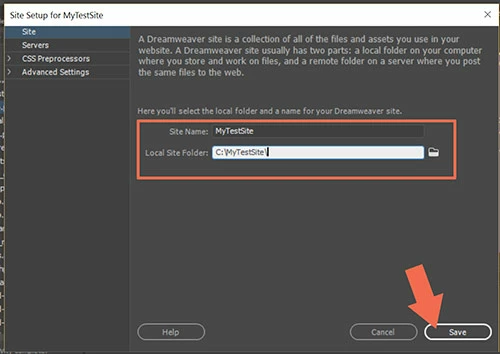
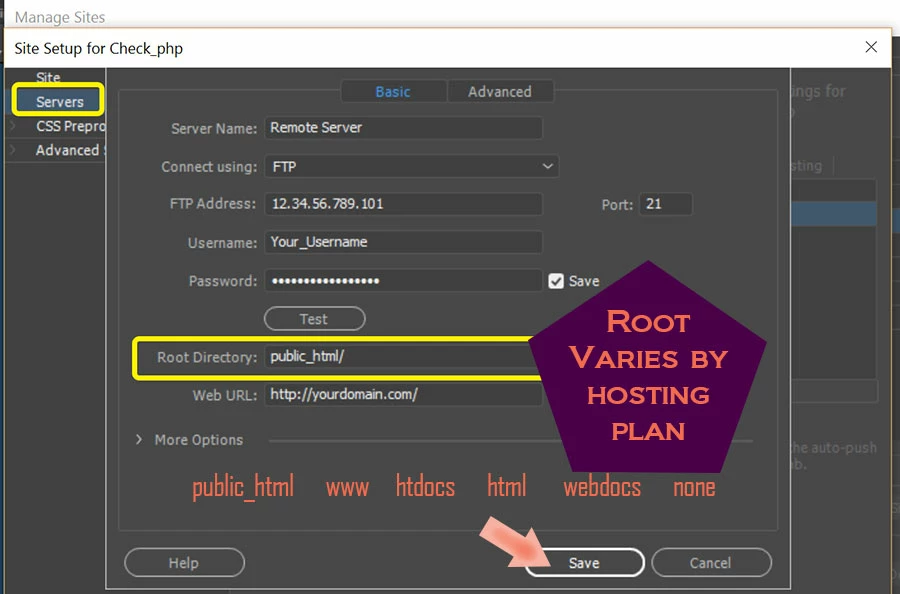
So now I would like to set up DreamWeaver properly for the editing (right?). In order to do this I assume I need to go through the "Manage Sites" process. I've done this kind of stuff before and have messed up. Since the domain I am moving the three pages too is very, very important and I don't want to mess it up is it possible for somebody to guide me on how to do this properly ?
Any help here will be greatly appreciated 
-John



 AdChoices