


Inspiring
Jul 12, 2020 1:59 PM UTC
Answered

Map field?

I've never done an imagemap in Dreamweaver (did heaps of them in GoLive)

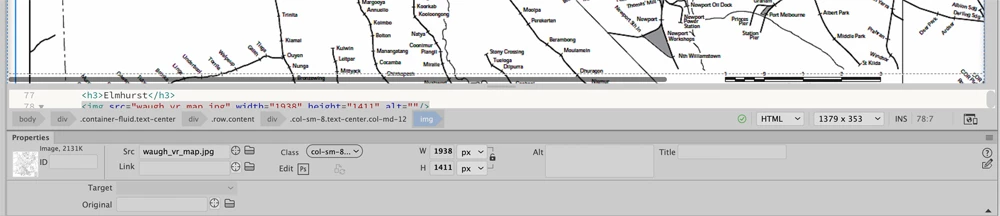
I'm using this document 

https://helpx.adobe.com/dreamweaver/using/image-maps.html

It says that when I select the image and expand properties I should get a map field but this is what my properties look like when I select the image. Where is this map field that the tutorial speaks of?

 

    This topic is closed to new replies. Start a new post to keep the conversation going.
    Nancy OShea
    Nancy OSheaCorrect answer
    Community Expert
    Jul 12, 2020 6:03 PM UTC

    For Image Maps, switch the Document Toolbar to Design from Live View.


    Incidentally, old fashioned image maps are not responsive.  Use another approach.


    Nancy O'Shea— Product User & Community Expert

    4 replies

    gunzelguyAuthor
    Inspiring
    Jul 12, 2020 3:19 PM UTC

    After messing about I found I got the map field up by toggling from Split to Code view. I then went back to split (after all, I've got to see the image to draw hotspots) the map field stayed up after I went back to Split view but none of the tools work. If I click on the "rectangle hotspot tool" and then go to my image and click, the map field and tools disappear! The image is a jpg and yes, I have given the image a name in the map field. Is this a bug or am I doing something wrong?

    Translate
    Nancy OShea
    Community Expert
    Nancy OSheaCommunity ExpertCorrect answer
    Community Expert
    Jul 12, 2020 6:03 PM UTC

    For Image Maps, switch the Document Toolbar to Design from Live View.


    Incidentally, old fashioned image maps are not responsive.  Use another approach.


    Translate
    Nancy O'Shea— Product User & Community Expert
    gunzelguyAuthor
    Inspiring
    Jul 12, 2020 9:11 PM UTC

    Thanks for that Nancy, that certainly fixed the problem. It would have been nice if Adobe included this essential info in their tutorial!


    Is there a way to get rid of the blue bounding box on the image in the browser after its been clicked?


    What is the modern way of doing an image map?


    Thanks again

    Translate