
Hosun
Inspiring
April 14, 2019
Answered

Media Query

  • April 14, 2019
  • 3 replies
  • 919 views

Hi,

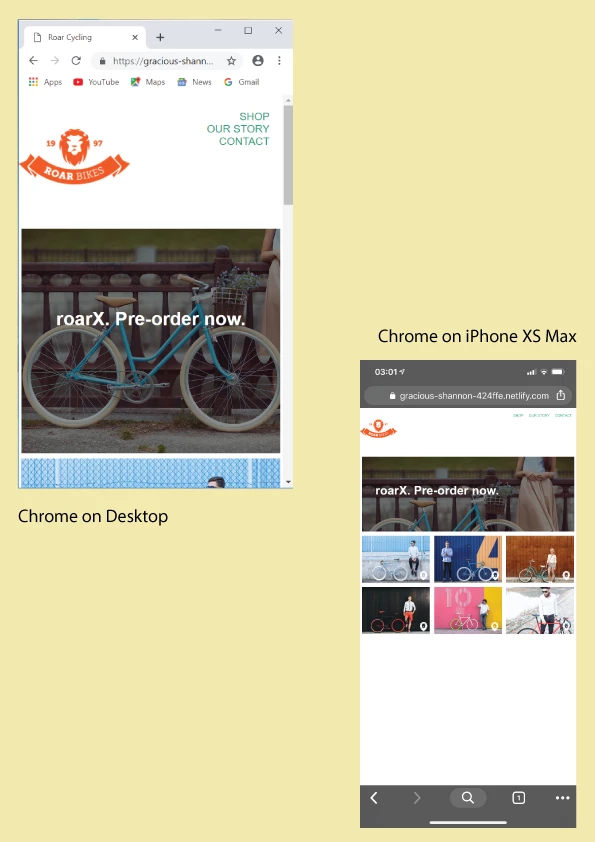
In the image below, Mobile View is seen on "Chrome on Desktop".

But it's not seen on "Chrome on iPhone".

How to fix the problem?

(I want to make Mobile View seen on iPhone.)

Hosun Kang
This topic has been closed for replies.
Correct answer Nancy OShea

You're missing the viewport meta tag for mobile devices.

Change your code on lines 1 - 5 from this:

<!doctype html>

<html>

<head>

<meta charset="utf-8">

<title>Roar Cycling</title>

to this:

<!doctype html>

<html lang="en">

<head>

<meta charset="utf-8">

<title>Roar Cycling</title>

<meta name="viewport" content="width=device-width, initial-scale=1">

<meta http-equiv="X-UA-Compatible" content="IE=edge">

3 replies

Hosun
HosunAuthor
Inspiring
April 14, 2019

Hi,

Thank you very much for your help.

Here is the link.

Roar Cycling

Hosun Kang

Nancy OShea
Community Expert
Nancy OSheaCommunity ExpertCorrect answer
Community Expert
April 14, 2019

You're missing the viewport meta tag for mobile devices.

Change your code on lines 1 - 5 from this:

<!doctype html>

<html>

<head>

<meta charset="utf-8">

<title>Roar Cycling</title>

to this:

<!doctype html>

<html lang="en">

<head>

<meta charset="utf-8">

<title>Roar Cycling</title>

<meta name="viewport" content="width=device-width, initial-scale=1">

<meta http-equiv="X-UA-Compatible" content="IE=edge">

Nancy O'Shea— Product User & Community Expert
Hosun
HosunAuthor
Inspiring
April 14, 2019

Thank you very much.

Now, everything is OK.

Hosun Kang

Hosun
HosunAuthor
Inspiring
April 14, 2019

Could you tell me what is "post a link to the problem page online"?

Is my question beyond the scope of the Adobe Community Forum?

Nancy OShea
Community Expert
Community Expert
April 14, 2019

For quickest help in this web forum,  please upload the page to your sits's remote server  Then post the website address here so we can look at it with our browsers.  

A distant 2nd option is to copy and paste all your code into a web forum reply.   But we don't have access to your images and other assets so we can't see what you see.  A link to your site is better for us to help you.

Nancy O'Shea— Product User & Community Expert
Nancy OShea
Community Expert
Community Expert
April 14, 2019

Please post a link to the problem page online.  The answers are in your code, not screenshots.

Nancy O'Shea— Product User & Community Expert

