Participant
March 13, 2018
Answered

menu buttons: New, save, cancel repeat.

  • March 13, 2018
  • 1 reply
  • 345 views

hello to everyone, after updating to the latest version I can no longer put the buttons: New, save, cancel repeat etc...
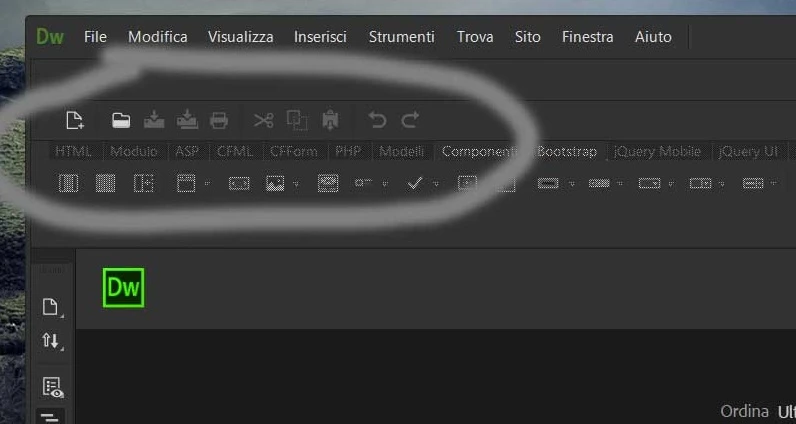
How can I do ?

Thank you

    This topic has been closed for replies.
    Correct answer Jon Fritz

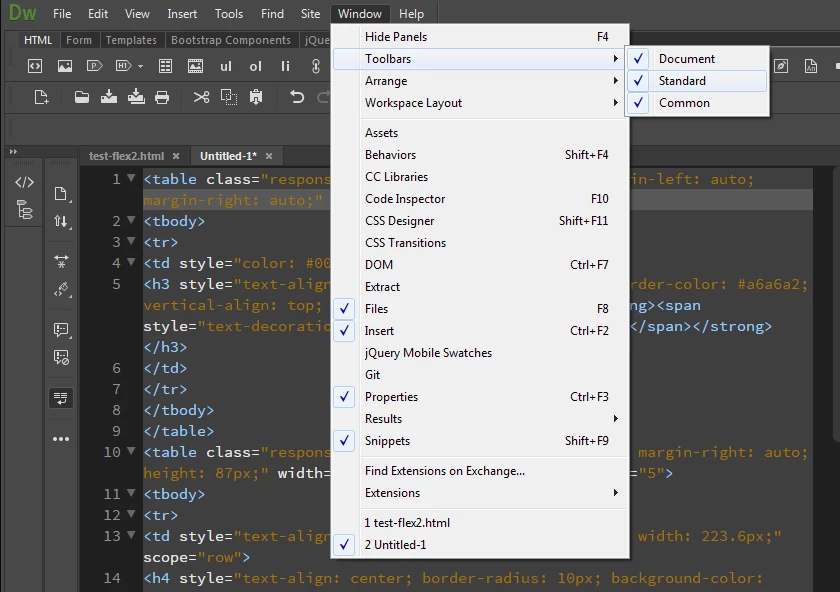
    That toolbar is added by going to Window > Toolbars > Standard...

    If you already have a checkmark by the "Standard" option in that menu, it may just be hiding behind something or on another screen.

    Try resetting your workspace by going to Window > Workspace Layout > Reset 'your workspace name'

    1 reply

    Community Manager
    March 13, 2018

    Hi,

    Thanks for reporting.

    Have you opened any document, the button in standard toolbar other than New and open enable when any document is open.

    clicking on New button works for me, doesn't it work for you?

    Thanks

    Participant
    March 13, 2018

    hello and thanks for your kind reply.

    maybe I explained myself wrong.

    the image that I attached would be what I want. But the indicated buttons are no longer present on my dreamweaver.

    The image is of another location where the buttons are present

    Jon Fritz
    Community Expert
    Jon FritzCommunity ExpertCorrect answer
    Community Expert
    March 13, 2018

    That toolbar is added by going to Window > Toolbars > Standard...

    If you already have a checkmark by the "Standard" option in that menu, it may just be hiding behind something or on another screen.

    Try resetting your workspace by going to Window > Workspace Layout > Reset 'your workspace name'