

nyds0806
Known Participant
January 21, 2018
Answered

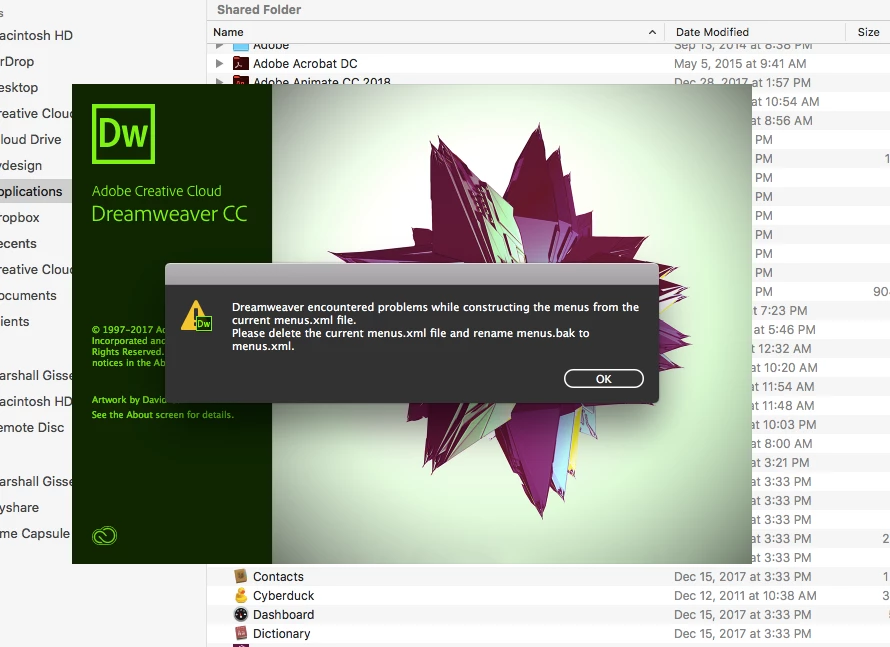
Menus.xml bug

  • January 21, 2018
  • 5 replies
  • 4452 views

Using a MacBook Air purchased 2014/15 (OS High Sierra 10.13.2)  Dreamweaver present this bug, and even following this dialogue box suggestion, the problem persists. Please advise of a sure fix ASAP.

Marshall Gisser

CEO, NYDesign.com
This topic has been closed for replies.
Correct answer c10032308

For those having the same issue with the recent major update (DW 2020).
Here is what solved the problem for me (sorry for the translation, french apps) :

  • Open menus.xml with Notepad++
  • Hit keys Ctrl + F
  • Click Replace tab
  • Insert && in search
  • Insert && in Replace by
  • Hit Replace all button
  • Save the file

When i restarted DW, everything was fine.


5 replies

Inspiring
June 25, 2020

Merci merci merci, this worked for me!

c10032308Correct answer
Participant
November 7, 2019

For those having the same issue with the recent major update (DW 2020).
Here is what solved the problem for me (sorry for the translation, french apps) :

  • Open menus.xml with Notepad++
  • Hit keys Ctrl + F
  • Click Replace tab
  • Insert && in search
  • Insert && in Replace by
  • Hit Replace all button
  • Save the file

When i restarted DW, everything was fine.


Participating Frequently
February 20, 2018

I am having this exact problem. I followed the instructions in the menus.xml error message and that did not fix it. I also deinstalled the DW 2018 and installed 2 earlier versions. Both had the same error message. DW will not open and I'm a deadline. Please help!

iMac late 2012, processor 3.4 GHZ Intel Core i7 (just had a new hard drive installed) OSX el Capitan ver 10.11.6.

BTW-All of the other Adobe CC apps are opening and working (tho sadly I could not resurrect Fireworks due to an unresolved  javascript error).

Nancy OShea
Community Expert
Community Expert
February 20, 2018

Did you run the CC Cleaner Tool before re-installing?

Use the Creative Cloud Cleaner Tool to solve installation problems

Nancy O'Shea— Product User & Community Expert
Participating Frequently
February 20, 2018

Thank you I will try this tonight.

On Tue, Feb 20, 2018 at 12:05 PM, Nancy OShea <forums_noreply@adobe.com>

Preran
Community Manager
Community Manager
January 23, 2018

If you still need help, I suggest getting in touch with Adobe Customer Care for assistance. Contact Customer Care

Thanks,

Preran

Nancy OShea
Community Expert
Community Expert
January 21, 2018

Can you use a previous version of DW?  2017 or even 2015?

Nancy O'Shea— Product User & Community Expert
nyds0806
nyds0806Author
Known Participant
January 21, 2018

I tried the previous 2017 version....same bug occurred.

Note: This occurs only on MacBook Air purchased 2014...not my 2011 (Spring) iMac Desktop running the same OS.

John Waller
Community Expert
Community Expert
January 21, 2018

Note: This occurs only on MacBook Air purchased 2014...not my 2011 (Spring) iMac Desktop running the same OS.

Must admit I have not seen this bug.

I'm running DW CC 2018 on High Sierra 10.3.2 on a mid-2013 MacBook Air. Wonder if there's any difference compared to a 2014 model?