paulus-van-beek
Participant
March 22, 2019
Answered

Migrate pages from Sharepoint designer to Dreamweaver

  • March 22, 2019
  • 3 replies
  • 1168 views

Hello,

I am interested in Dreamweaver to continue to design my existing webpages (www.endtimeharvestrevival.org  ) that I did before with the program SharePoint Designer. But it's not working good anymore and there are no newer version available.

I like to know the purchase price and if I can transform my existing pages from SharePoint designer into Dreamweaver Page in an easy way, there I do have many pages designed. If so I like to start with a trial, and if that is working out great, I will buy. My @ mail is ------------  and I just opened an account under Paulus --------- ---------or Phone ----------.

Thank you for your time

[This is a community forum—personal information was removed for your protection.]

This topic has been closed for replies.
Correct answer Nancy OShea

Dreamweaver doesn't support Frames.  Your framed website will have to be re-built without frames and responsively to work well in mobile & tablet devices.   You will need to create or find a good responsive layout to work with.  Then you will need to copy and paste old text into the new layout.

Step 1 -  Define a site.

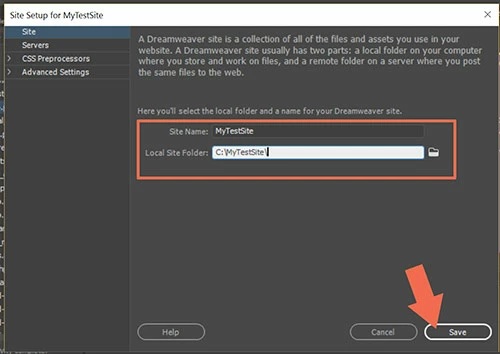
Go to Site > New Site and enter a folder name for your project.   For example, C:\MyTestSite\

Step 2 - Starter Page

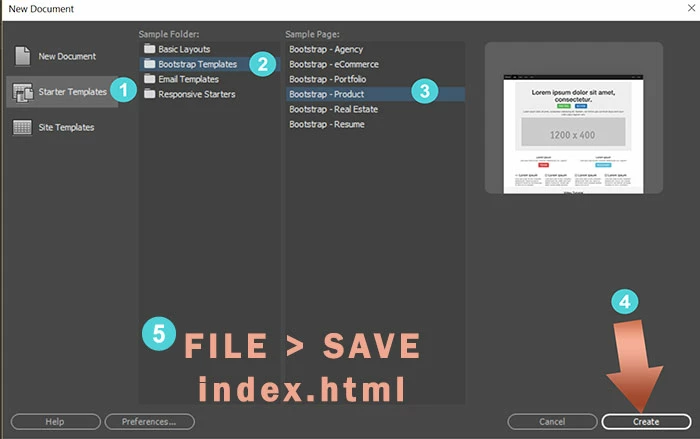
Go to File > New > Starter Templates.   Select one and hit Create button.

Save your newly created starter page (Ctrl / Cmd + S) and name it index.html.

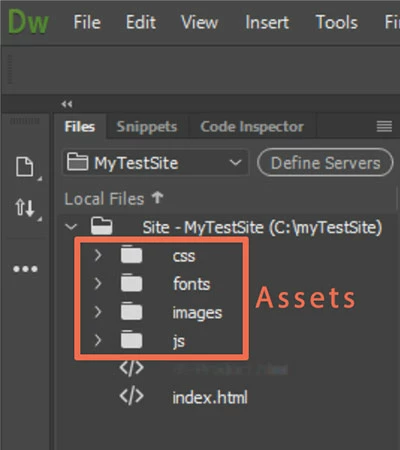
Open the Files Panel ( Window > Files or F8)  to see the site files and assets.

Post back if you have questions.

3 replies

Nancy OShea
Community Expert
Nancy OSheaCommunity ExpertCorrect answer
Community Expert
March 22, 2019

Dreamweaver doesn't support Frames.  Your framed website will have to be re-built without frames and responsively to work well in mobile & tablet devices.   You will need to create or find a good responsive layout to work with.  Then you will need to copy and paste old text into the new layout.

Step 1 -  Define a site.

Go to Site > New Site and enter a folder name for your project.   For example, C:\MyTestSite\

Step 2 - Starter Page

Go to File > New > Starter Templates.   Select one and hit Create button.

Save your newly created starter page (Ctrl / Cmd + S) and name it index.html.

Open the Files Panel ( Window > Files or F8)  to see the site files and assets.

Post back if you have questions.

Nancy O'Shea— Product User & Community Expert
Community Expert
March 22, 2019

Paulus - I wouldn't recommend Dreamweaver as a replacement to Sharepoint Designer if you are using a version of Sharepoint that still supports it. I don't believe the newer versions of Sharepoint 365.  For basic HTML/CSS you can try DW, but I would download the demo that Barb pointed to and see if it works for you.

Barb Binder
Community Expert
Community Expert
March 22, 2019
~Barb at Rocky Mountain Training