
Known Participant
December 18, 2018
Answered

Migration from DW 2014->2019: Keyboard Shortcuts and Tag Library

  • December 18, 2018
  • 1 reply
  • 688 views

I wish to have less work with the migration of parts of my settings from DW 2014 to DW 2019:

Keyboard Shortcuts and Tag Library

Of course there are lots of differences between the two versions, so a simple export will not work, I suppose.

My question:
Is there controlled process like "import only those keyboard shortcuts where the commands exist in DW 2019"?

And the same for the tag library?

What do suggest please to have not the complete work of creating all the shortcuts as new ones in DW 2019?

Thanks!

I talk about DW on maOS.

But when it comes to config files, feel free to mention the paths of the version for windows. I will find the corresponding paths on macOS myself.

This topic has been closed for replies.
Correct answer Nancy OShea

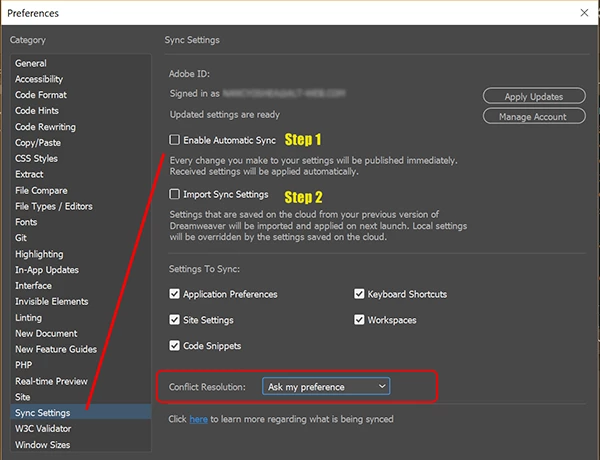
I synched settings in 2014 to the cloud and imported synched settings into 2017 and later 2019 without any problems.   The 1st time you sync to the cloud may take a while though so be patient.   Also, you'll need to restart  DW after you import settings.

1 reply

Preran
Community Manager
Community Manager
December 19, 2018
Known Participant
December 19, 2018

Thanks for the idea, Preran.

Typically I'm not a big fan of synchronizing stuff with a cloud.

But that's not a dogma.

Is it true, that there's no official way of an import of keyboard shortcuts without the cloud?

Would you expect, that a transfer via cloud would work between versions where the one of them is 5 years older?

Preran
Community Manager
Community Manager
December 19, 2018

I would imagine so, because I have never done it myself. Hopefully, someone else here has and can fill you in with any associated risks that you should be aware of.