Answered
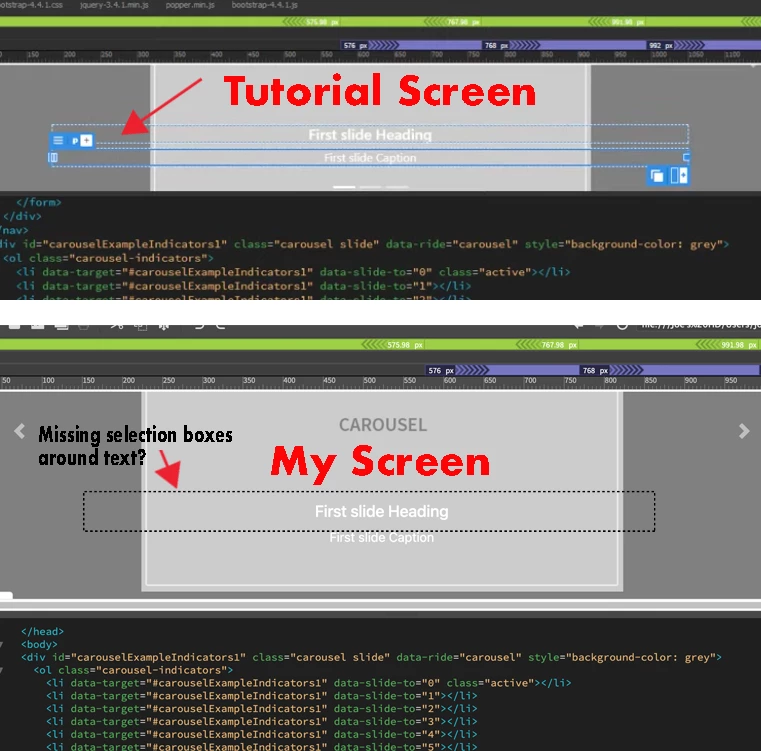
Missing blue frames around text when selected.
Using Deamweaver 21.3
Can't see blue frames surrounding text or images used to move or resize in the design window.
What am I not selecting in my perferences to show the frames around the text?

Using Deamweaver 21.3
Can't see blue frames surrounding text or images used to move or resize in the design window.
What am I not selecting in my perferences to show the frames around the text?
Can you click on View --> Live View Options and make sure "Hide Live View Displays" is not checked? I've also found this old thread that details if you have special characters on your HDD paths that this can also cause the issue you are describing with DW: https://community.adobe.com/t5/dreamweaver-discussions/element-display-missing-in-dw-2017/m-p/8984059
Already have an account? Login
No account yet? Create an account
Enter your E-mail address. We'll send you an e-mail with instructions to reset your password.


 AdChoices