Answered
Missing Developer.xml
I am unable to change the workspace to Developer mode because the Developer.xml file is blank. Not sure how this happened but how can I get it recreated?
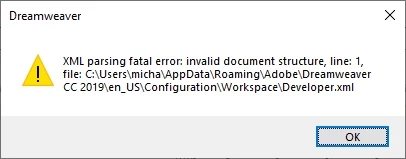

I am unable to change the workspace to Developer mode because the Developer.xml file is blank. Not sure how this happened but how can I get it recreated?
Turn on your operating system's Hidden Files, then follow the path given in the error window you posted...
C > Users > your username > AppData (normally hidden) > Roaming > Adobe > Dreamweaver (your version) > your language > Configuration
...and rename the Configuration folder to Configuration_old.
When you restart DW, it will recreate the folder with fresh copies of the files it holds and should recreate your Developer workspace.
Already have an account? Login
Enter your E-mail address. We'll send you an e-mail with instructions to reset your password.


 AdChoices