

Kacey101612GSD
Inspiring
August 19, 2017
Answered

Missing navagation bars DreamweaverCC

  • August 19, 2017
  • 2 replies
  • 1060 views

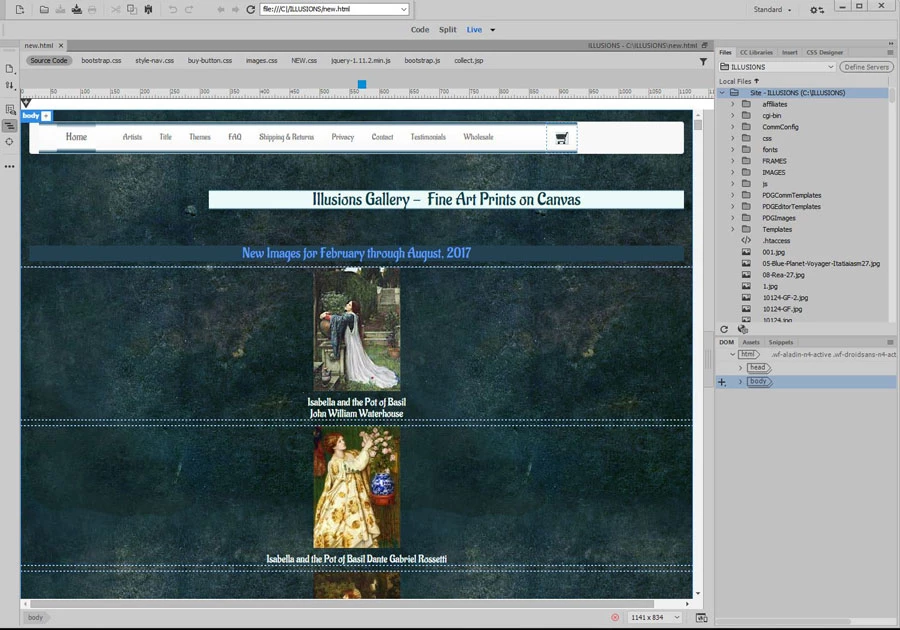
All tool and navigation missing. Here is a screen shot of page:

File,edit....window..help.etc missing as well as properties toolbar at bottom and pretty much everything else.

Help? Thanks
    This topic has been closed for replies.
    Correct answer Nancy OShea

    Hi Nancy,

    Followed the instructions; can't get the reset preferences box to come up. Held down Windows key, Ctrl, Shift, and double clicked on Dreamweaver.exe. and nothing happens.


    OK.  Sounds like a bad installation.

    Use the CC Cleaner Tool below to wipe CC from your system.   Then reinstall.

    http://helpx.adobe.com/creative-suite/kb/cs5-cleaner-tool-installation-problems.html

    Nancy

    2 replies

    anissa_thompson
    Community Expert
    Community Expert
    August 21, 2017

    Kacey, did you try resetting your workspace? Something like this (your version of Dw may differ):

    Image result for adobe help reset dreamweaver workspace

    I can see your workspace says "Standard"; try clicking there and hitting "Reset 'Standard'", or try any of the other workspaces to see if you get the returned default menus/layout.

    Hope this helps! Make sure to press "✔ Correct Answer" on this post if this answers your question. Happy Creating!Anissa • @anissat
    Kacey101612GSD
    Inspiring
    August 22, 2017

    Yay! Thank you Nancy! It took a while to successfully uninstall and re install but I worked!

    Nancy OShea
    Community Expert
    Community Expert
    August 19, 2017
    Nancy O'Shea— Product User & Community Expert
    Kacey101612GSD
    Inspiring
    August 19, 2017

    I tried the first one then restarted Dreamweaver.Nothing had changed, but i noticed that

    it had not created a new cache. Do I need to rebote the computer for it to take effect?

    "When you restart Dreamweaver, it will create a new cache file."

    Nancy OShea
    Community Expert
    Community Expert
    August 19, 2017

    Close DW.

    Restore Preferences.

    Reboot your computer.

    Nancy

    Nancy O'Shea— Product User & Community Expert

