


Per Berntsen
Community Expert
Community Expert
November 26, 2025
Question

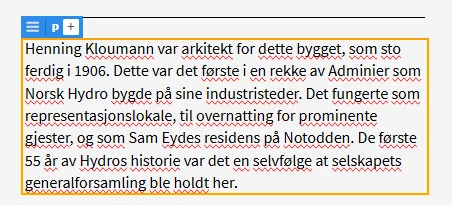
Misspelled words are flagged when editing text in Live view

  • November 26, 2025
  • 1 reply
  • 424 views

Spell check is a Design view feature only as far as I know. Tools > Spell check is greyed out in Live view.

But when editing text in Live view, misspelled words are flagged with no options to ignore or replace. 

I work with several languages, so this is a major annoyance.


I have tried resetting the preferences, and even an uninstall/reinstall.

I tried renaming the Linguistics folder in C:\Program Files\Adobe\Adobe Dreamweaver 2021\ in the hope that this would disable spell check altogether, but it made no difference.

This leads me to believe that this might be a Windows issue, but the Windows setting Highlight misspelled words is turned off. Also, the same words seem to get flagged no matter what language is set in Dw's preferences > Spelling dictionary.


Dw 21.6, Windows 11 Pro 25 H2.

I also have a Windows 10 computer with the same version of Dw, where this doesn't happen.
 

    1 reply

    Per Berntsen
    Community Expert
    Community Expert
    November 26, 2025

    It turned out that I had version 21.3 on the Windows 10 computer, not 21.6 as I thought.

    I updated to 21.6, and the spell check issue appeared, just like on the Windows 11 computer.

    So I suspect that this is a bug in 21.6.

    Jon Fritz
    Community Expert
    Community Expert
    November 26, 2025

    Looks more like an unfinished feature to me.

    It seems to be intentional, as the lines will disappear when focus is taken off of an element with html text inside.

    Leading me to think maybe they just didn't have enough time to put a toggle of some sort in before 21.6 came out.

    Per Berntsen
    Community Expert
    Community Expert
    November 27, 2025

    I have tried several of the 21.x versions, and it turns out that this "feature" was introduced in 21.5, so there should have been plenty of time to get it right.

    If it is a feature, it seems to indicate that there is some development going on, after all.

    Anyway, I solved the problem by installing version 21.4.