Participant
September 24, 2018
Answered

Moving DW website and content to new account

  • September 24, 2018
  • 3 replies
  • 530 views

Dear Sir, dear Madam,

I had already subscribed to Dreamweaver CC, using my private email as account. I have used Dreamweaver CC to build and publish my website. I was stil using Photoshop CS and Indesign CS.

I have now a new (buisiness)account for all Adobe CC, so i wil start using Photoshop CC and Indesign CC as well.

I want to include Dreamweaver as well in my new complete account. And then cancel the old private account. I want of course to keep my current website and content.

I am not sure how to do this. Can you pleas advice/help?

Best regards,

Mieke

    This topic has been closed for replies.
    Correct answer Nancy OShea

    Yep, I totally get it. But like I said, even if it would sync everything except the server username and password, it would be a big help.


    I export my site definition settings to STE files and store them on external drives.  I keep these updated regularly in case I ever need to import them to a new PC or  version of DW.  

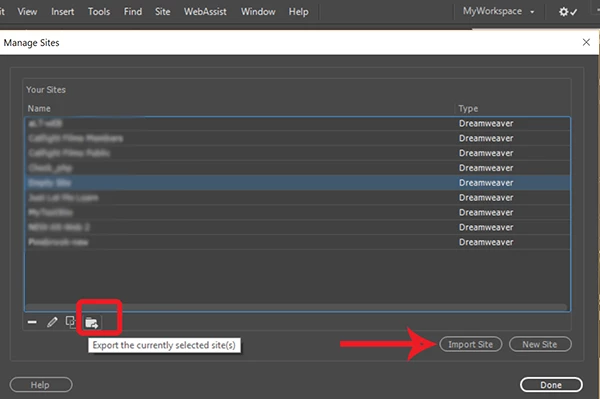
    Go to Site > Manage Sites > Select one or all sites and hit the Export button.

    Incidentally, STE files can be shared with colleague or clients.  However, I do not put these on the cloud for obvious security reasons.

    3 replies

    Nancy OShea
    Community Expert
    Community Expert
    September 24, 2018

    @miekej6464848,

    Are you using Business Catalyst for your web hosting?

    Nancy O'Shea— Product User & Community Expert
    hammer0909
    Community Expert
    Community Expert
    September 24, 2018

    Although we can't help you with your Adobe ID for each account, the files that make up your web site reside locally on your computer. So all you need to do is define the site in the new copy of Dreamweaver that you installed and point it to the location of the site folder on your local hard drive. If you choose Site > Manage Sites in your old copy of Dreamweaver, you can export the site configuration (a small folder at the bottom of the Manage Sites Window) and then if you open your new copy of Dreamweaver, you can import those site settings using the Import button. Of course this is all supposedly possible by syncing your settings to your Adobe account, but I've struggled for quite some time to get that to successfully work.

    pziecina
    Legend
    September 24, 2018

    https://forums.adobe.com/people/Chad+Chelius  wrote

    Of course this is all supposedly possible by syncing your settings to your Adobe account, but I've struggled for quite some time to get that to successfully work.

    The cloud syncing feature is only for Dw preferences, and not for site settings. The reason is probably because of security concerns, as site settings contains all the info required for access to a web sites via ftp.

    hammer0909
    Community Expert
    Community Expert
    September 24, 2018

    My only argument there is are you saying that my Creative Cloud files are not secure? Even if it synced everything EXCEPT the FTP passwords, that would be a huge help!

    BenPleysier
    Community Expert
    Community Expert
    September 24, 2018

    Mieke,

    This is a user2user forum and there is very little that we can do for you. You are best off getting in touch with Adobe using other means.

    Probeer Contact Customer Care

    Veel geluk.

    Wappler is the DMXzone-made Dreamweaver replacement and includes the best of their powerful extensions, as well as much more!