martinv44029552
Inspiring
June 19, 2017
Answered

Moving h1 away from left hand margin and changing color of text

  • June 19, 2017
  • 3 replies
  • 508 views

Hello

I finally bit the bullet and downloaded the full Dreamweaver software.

i tried a couple of free packages but as i'm doing a Dreamweaver course, it seemed sensible!  As well as dipping into the w3schools tutorials.  Maybe I'm rushing ahead but I'm stuck at the moment!

Three fold question here,

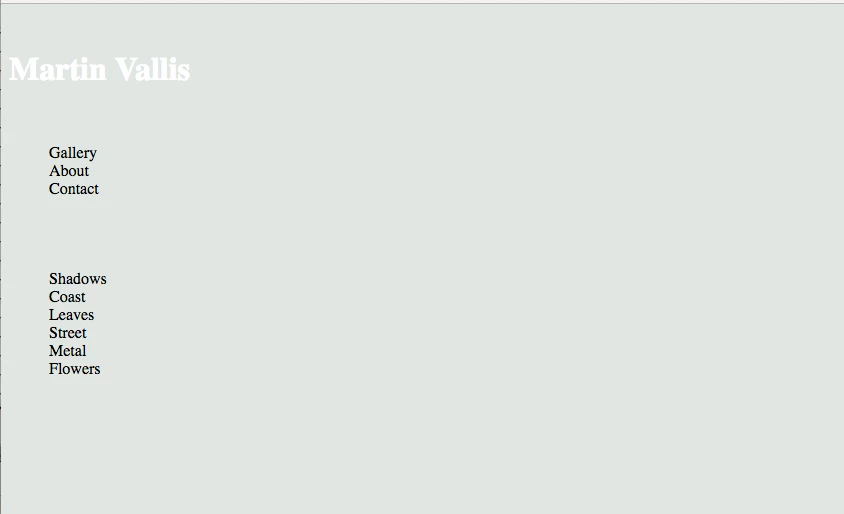
1. I'd like my name "Martin Vallis" to be aligned to the "G" in Gallery. What code do I need to input?

2. I'd like the text of my categories to be in white, I've achieved it once but somehow have lost it?

3. I'd like to also change all the text fonts to gill sans, I've tried this, in a variety of positions within the body but no luck, <style ="font-family:gill sans;"> </style>

Obviously doing something wrong any help appreciated, thanks in advance.

    This topic has been closed for replies.
    Correct answer Jon Fritz

    martinv44029552  wrote

    Hello

    I finally bit the bullet and downloaded the full Dreamweaver software.

    i tried a couple of free packages but as i'm doing a Dreamweaver course, it seemed sensible!  As well as dipping into the w3schools tutorials.  Maybe I'm rushing ahead but I'm stuck at the moment!

    Three fold question here,

    1. I'd like my name "Martin Vallis" to be aligned to the "G" in Gallery. What code do I need to input?

    2. I'd like the text of my categories to be in white, I've achieved it once but somehow have lost it?

    3. I'd like to also change all the text fonts to gill sans, I've tried this, in a variety of positions within the body but no luck, <style ="font-family:gill sans;"> </style>

    Obviously doing something wrong any help appreciated, thanks in advance.

    1. The browsers give a default padding in the ul and ol tags of around 1.5em. You can either remove that padding by setting it to zero for the ul, or add a margin-left to your heading to get it to move over.

    2. Looks like fixing the errors repaired your color issue.

    3. gill sans is not a "web safe" font. Meaning, unless you take steps to add the font to your server, or link to a font on another server (like google fonts or font squirrel) your viewers won't be able to see it because it's not installed on their machines.

    The most likely reason it wasn't working originally is because font names with spaces in them need to be surrounded by quotes in your css, since you are using double quotes for the style attribute, you will need to use single quotes for the property's value...

    <div style="font-family:'gill sans';">your content</div>

    However, like I mention above, anyone without gill sans installed won't see it, rather, they'll the browser default serif font. You should use either a font-stack like...

    font-family:'gill sans', verdana, tahoma, arial, sans-serif;

    ...where the viewer's browser will use the first font it recognizes as being installed, or look into the @font-face css rule with and place a font that's licensed for web use on your server...

    CSS3 @font-face Rule

    3 replies

    Jon Fritz
    Community Expert
    Jon FritzCommunity ExpertCorrect answer
    Community Expert
    June 20, 2017

    martinv44029552  wrote

    Hello

    I finally bit the bullet and downloaded the full Dreamweaver software.

    i tried a couple of free packages but as i'm doing a Dreamweaver course, it seemed sensible!  As well as dipping into the w3schools tutorials.  Maybe I'm rushing ahead but I'm stuck at the moment!

    Three fold question here,

    1. I'd like my name "Martin Vallis" to be aligned to the "G" in Gallery. What code do I need to input?

    2. I'd like the text of my categories to be in white, I've achieved it once but somehow have lost it?

    3. I'd like to also change all the text fonts to gill sans, I've tried this, in a variety of positions within the body but no luck, <style ="font-family:gill sans;"> </style>

    Obviously doing something wrong any help appreciated, thanks in advance.

    1. The browsers give a default padding in the ul and ol tags of around 1.5em. You can either remove that padding by setting it to zero for the ul, or add a margin-left to your heading to get it to move over.

    2. Looks like fixing the errors repaired your color issue.

    3. gill sans is not a "web safe" font. Meaning, unless you take steps to add the font to your server, or link to a font on another server (like google fonts or font squirrel) your viewers won't be able to see it because it's not installed on their machines.

    The most likely reason it wasn't working originally is because font names with spaces in them need to be surrounded by quotes in your css, since you are using double quotes for the style attribute, you will need to use single quotes for the property's value...

    <div style="font-family:'gill sans';">your content</div>

    However, like I mention above, anyone without gill sans installed won't see it, rather, they'll the browser default serif font. You should use either a font-stack like...

    font-family:'gill sans', verdana, tahoma, arial, sans-serif;

    ...where the viewer's browser will use the first font it recognizes as being installed, or look into the @font-face css rule with and place a font that's licensed for web use on your server...

    CSS3 @font-face Rule

    martinv44029552
    Inspiring
    June 21, 2017

    John

    Many apologies for not getting back to you sooner.

    Thanks for the information and yes it did correct my type colour issues

    I've also learnt today how to re position my images, so as long as I do learn something new everyday, then that's brilliant.

    Feel like a kid with a new toy.

    Thanks again.

    Nancy OShea
    Community Expert
    Community Expert
    June 19, 2017

    I think you should begin with one of the pre-built starter Templates in DW CC.  It will give you a chance to see how HTML and CSS code works together in a structured layout.

    I see nothing wrong with doing W3 Schools tuts & exercises.  It's a great way to learn code.   And coding skills are essential.   So keep doing that.

    In the meantime, define a local site folder for your project.  Go to Site > New Site...  See screenshots.

    Next, go to File > New > Starter Templates.  Select a layout and hit the Create button.

    After saving your document, DW will create the assets and folders for you which can be seen in your Files Panel (F8).

    You now have a beginning site to work with.  Examine the code in your HTML, CSS and other asset folders.

    Have fun with it!

    Nancy

    Nancy O'Shea— Product User & Community Expert
    martinv44029552
    Inspiring
    June 19, 2017

    Thanks Nancy

    Useful suggestions, maybe my eagerness means I'm overlooking the detail.

    Nancy OShea
    Community Expert
    Community Expert
    June 19, 2017

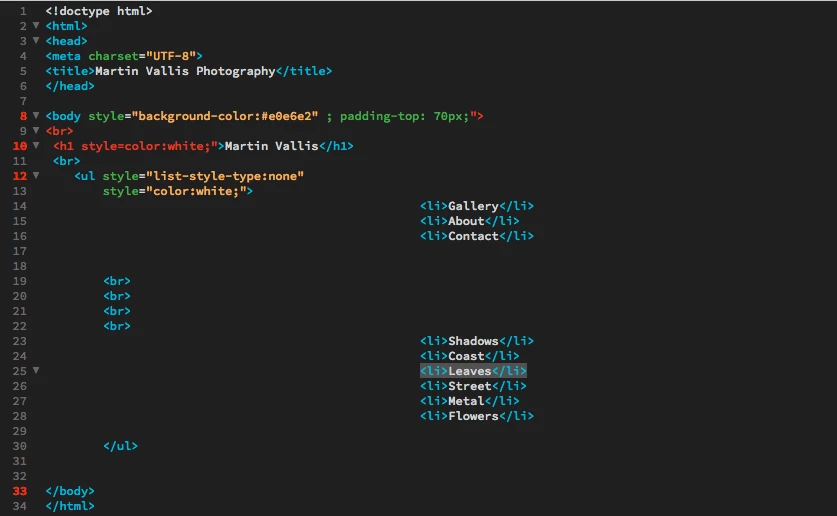
    Why is your code formatted with so much indented white space?

    You might want to use the Format Source Code button on your Common toolbar to tighten things up a little.

    Nancy O'Shea— Product User & Community Expert
    Jon Fritz
    Community Expert
    Community Expert
    June 19, 2017

    See those red line numbers in your source code?

    That means you have errors in your code. Hover your mouse over the red numbers for a pop up error hint.

    Right now, you have a problem with your quote formatting...

    style="property:value; property:value; property:value;"

    On line 8, you have too many " marks.

    On line 10, too few (you need to wrap the style's property and value).
    On line 12, you have duplicated the style attribute (you can't do that).

    martinv44029552
    Inspiring
    June 19, 2017

    Thanks John for your input, it's a very useful tip, about numbers in red, obviously something new learned