Known Participant
January 12, 2019
Answered

My changes in Dreamweaver are not showing up online

  • January 12, 2019
  • 3 replies
  • 11766 views

This is driving me crazy.  I have used Dreamweaver for years and never had this problem.  Using it currently and it doesn't happen on other sites.  I am making changes to pages and then uploading them as well as the css files.  Some of the changes show up but some of them do not.  I have refreshed, cleared the cache, quite Safari, tried another browser.  Still don't show.  Is this a bug in the software?  Driving me nuts!

This topic has been closed for replies.
Correct answer BenPleysier

Lazy-Ass Gardening

Special Offer Until April 1

Preorder this book for $15

After April 1 - $20

Retail $24.95

Softcover, 215 pages
79 easy to understand illustrations
• 16 pages of color

Web Site Price $20 includes tax and shipping

Publisher: Metamorphic Press (2019)

Free 4th class shipping, handling, and tax

That is one area in lower left that I changed and shows up in DW but not online.


OK, got the picture, just not what the fix is yet.

To see what is happening, click the 'Expand....' button to show both local and remote sites.
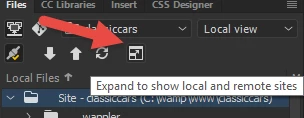
Check to see when the files were modified. If your application does not show the modified column, then right click the top bar and choose to show the column.

If the modified date is not correct, choose the file that you want uploaded and click the 'put' button

If nothing changes there, then we will have to have a look at Site Setup to make sure that the destination directory has been properly assigned.

3 replies

Participant
June 20, 2023

For me this was caused by my private wireless network being set as a public network.  Windows defender gave me a hint, then I think I read that somewhere as well.  Double check to make sure you Windows Defender firewall does not think your wireless is a public (dangerous) network.  I only had to set my wireless to private and everything worked normall.  Before that it was randomley not uploading some files that appeared updated on my local site.

BenPleysier
Community Expert
Community Expert
January 12, 2019

I understand your emotion, but you have given us very little to go on for us to help you.

Please give us specific details such as

  • O/S
  • version of Dreamweaver
  • link to the site
  • the nature of the change that you want to make

At This stage I am assuming that you are on a Windows system, using Chrome as your browser and the changes that you are not seeing are CSS/image related. In which case I would use the following key combination CTRL+SHIFT+DEL and choose 'Clear data' in the modal. I would then refresh the browser.

Wappler is the DMXzone-made Dreamweaver replacement and includes the best of their powerful extensions, as well as much more!

MartyR707Author
Known Participant
January 12, 2019

Sorry - I did indicate DW on my Mac but guess it didn't show up.

Mac OS 10.13.6

DW 2015

One of the pages having problems:

https://robertkourik.com/books/lazy-ass.html

I have added more text and change the color of some of the text.  Looks fine in Live view in DW, but will not show up in Safari or Firefox.  I did finally get some things to show up by clearing cache and quitting program, etc.  But the latest ones just won't appear.

MartyR707Author
Known Participant
January 12, 2019

Lazy-Ass Gardening

Special Offer Until April 1

Preorder this book for $15

After April 1 - $20

Retail $24.95

Softcover, 215 pages
79 easy to understand illustrations
• 16 pages of color

Web Site Price $20 includes tax and shipping

Publisher: Metamorphic Press (2019)

Free 4th class shipping, handling, and tax

That is one area in lower left that I changed and shows up in DW but not online.

ALsp
Legend
January 12, 2019

Test your FTP efficacy. The best way is to place a time at the top of your CSS file or in a comment in the page head of a document. Open the page online and view the file(s) in Developer tools (Chrome, not Safari). If you do not see the time in your comments, then you have an FTP or server issue. If you want, place your comments and then post a link to the page here so other can help you check.

MartyR707Author
Known Participant
January 12, 2019

remind me how to comment - I am a beginner with css


