Known Participant
January 5, 2011
Answered

MySQL Connection - remote - access problem

  • January 5, 2011
  • 1 reply
  • 639 views

I've been through the development and testing of my website and now I am trying to deploy it.

I've signed up to a new host and acquired a new domain. I've been able to FTP all files and the basic site works. However the dynamic parts using MySQL and WordPress are not set up correctly.

As the first step to correcting this I've set up the remote Data base and one Table (same definition as the local testing). I've imported the same data to this table and this looks alright. The only difference I can see is that the Host restricts the Data base name by prefixing with my id and a '_' and therefore I've had to shorten the name to 'famhist' instead of 'familyhistory'.

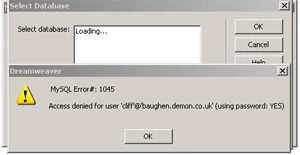
My problem comes when I try to set up the MySQL Connection and try to select the Database it produces the following error message:

What I don't understand is where it would have picked up up the '.demon' part of this name. The website I'm going to replace has the '.demon' in the name but the new site does not.

My new host does allow remote test connection.

I'm using DW CS5 under Windows XP.

Any help would be much appreciated.
This topic has been closed for replies.
Correct answer David_Powers

baughen wrote:

Could you also clarify which 'user name' should be used as I've seen different descriptions and they vary or are unclear. Is it the FTP account, the host login account or the Data Base user account?

And finally, as the data base name is different between the local and remote I assume that I need to change the local one to match the remote (which my host forces a certain format)?

When connecting to a database, it's the database user account name and password that should be used.

Since your hosting company determines the database name for you, it makes much more sense to use the same database name in your local testing environment. In fact, you should also set up a local MySQL user account that uses the same login details as your remote database. Then, the only change you'll need to make to the connection file is changing from localhost to the name of your remote server.

1 reply

David_Powers
Inspiring
January 5, 2011

That's a message coming from the MySQL server. cliff is the username, everything after the @ mark is the name of the server that MySQL is running on.

baughenAuthor
Known Participant
January 6, 2011

Thanks for your reply.

I'm afraid that I still don't understand where it is picking up the server name. Attached is a variation on the MySQL Connection panel (User & password changed for security reasons) which shows the MySQL Server name without '.demon' that I input.

If I change the MySQL server to 'localhost' the message changes @localhost .

Could you also clarify which 'user name' should be used as I've seen different descriptions and they vary or are unclear. Is it the FTP account, the host login account or the Data Base user account?

And finally, as the data base name is different between the local and remote I assume that I need to change the local one to match the remote (which my host forces a certain format)?

Thanks

Cliff

David_Powers
David_PowersCorrect answer
Inspiring
January 7, 2011

baughen wrote:

Could you also clarify which 'user name' should be used as I've seen different descriptions and they vary or are unclear. Is it the FTP account, the host login account or the Data Base user account?

And finally, as the data base name is different between the local and remote I assume that I need to change the local one to match the remote (which my host forces a certain format)?

When connecting to a database, it's the database user account name and password that should be used.

Since your hosting company determines the database name for you, it makes much more sense to use the same database name in your local testing environment. In fact, you should also set up a local MySQL user account that uses the same login details as your remote database. Then, the only change you'll need to make to the connection file is changing from localhost to the name of your remote server.