
Inspiring
March 3, 2022
Question

mystery files in Files panel

  • March 3, 2022
  • 3 replies
  • 152 views

Hi. I recently suffered a setback where my DW sites disappeared from my Files panel and the Manage Sites dialog box, also some other strange behaviors. I have been getting things back to normal with the help of Nancy O'Shea, but the Files panel is still a puzzle. See screenshot:
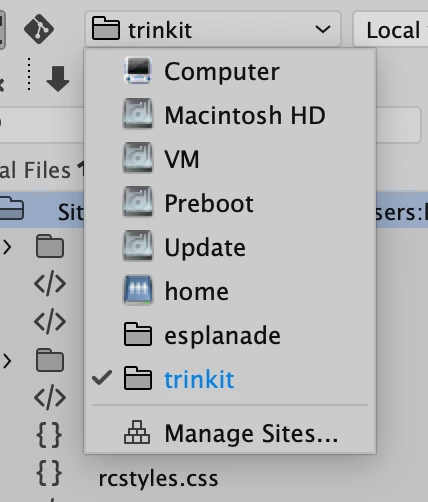
The two folders at the bottom are two of my sites, but what the heck is the rest? They have nothing to do with Dreamweaver, my files or html. Also, I've never heard of VM, Preboot, Update or Home! If I could figure out why these mystery files are showing up in the Files panel, I might be able to prevent this sort of thing from happening again.

Thanks,

Kevin Burke

Cambridge, Massachusetts

    This topic has been closed for replies.

    3 replies

    Community Expert
    March 3, 2022

    Those drives won't vary from mac to mac. Those are standard drives that always show up. Dreamweaver scans for volumes on your machine and those default ones will always show up, always have.  Not sure there is anyway to find them.

    Nancy OShea
    Community Expert
    Community Expert
    March 3, 2022

    You might benefit from a "getting to know your Mac" computer classs.


    Nancy O'Shea— Product User & Community Expert
    Jon Fritz
    Community Expert
    Community Expert
    March 3, 2022

    Those are local hard drives and network locatons.

    While the names will change from computer to computer, DW always displays local HD's and network locations in that particular dropdown menu.