


Participant
June 12, 2017
Answered

Настройка курсора редактирования

  • June 12, 2017
  • 3 replies
  • 1154 views

Как настроить редактор в режиме вставки, а не замены в dreamweaver сс? Не могу найти эту настройку даже в интернете. Мне НЕ нужно ставить курсор в середине текста и вводить текст при этом, чтоб правая часть стиралась, НЕ НУЖНО! Как исправить?

This topic has been closed for replies.
Correct answer Nancy OShea

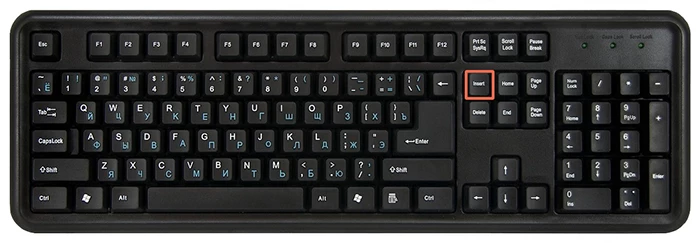
The issue of Insert mode reverting to Overtype mode on Russian keyboards has been reported.  I don't know if this has been fixed yet.

Click the Insert key on your keyboard.   See screenshot.

Nancy

3 replies

Nancy OShea
Community Expert
Nancy OSheaCommunity ExpertCorrect answer
Community Expert
June 12, 2017

The issue of Insert mode reverting to Overtype mode on Russian keyboards has been reported.  I don't know if this has been fixed yet.

Click the Insert key on your keyboard.   See screenshot.

Nancy

Nancy O'Shea— Product User & Community Expert
Per Berntsen
Community Expert
Community Expert
June 12, 2017

Is the problem that you are overwriting text when typing in the code editor?

Does the status bar at the bottom look like this?

If so, click OVR, and it will change to INS and allow you to type normally.

Preran
Legend
June 12, 2017

Can you provide us with more details of what you are trying to do? I am unable to understand your issue based on what you said. What is MOP?

What are you trying to do, and what are you trying to achieve? If you provide those details, it would be easier to help.

Thanks,

Preran