jcbailey2468
Participant
February 19, 2017
Answered

Navigation breaks in Chrome

  • February 19, 2017
  • 1 reply
  • 379 views

Hello, I'm having a problem when accessing my website(s) from the server. I used Dreamweaver CC2017 to turn an unordered list into a navigation bar. Everything looks fine when launched locally in Safari and Chrome, but the nav bar shows as an unordered list in Chrome (looks fine in Safari) when accessed from the remote server. I've removed and re-uploaded the files multiple times, but I can't figure out why it's not working.

Here are the site links (This is for a class assignment. The book we're using is Adobe Dreamweaver Revealed.):

http://vader.aacc.edu/~ctp120a1/lab_1/striped_umbrella/index.html

http://vader.aacc.edu/~ctp120a1/lab_1/blooms_bulbs/index.html

Thanks

This topic has been closed for replies.
Correct answer Nancy OShea

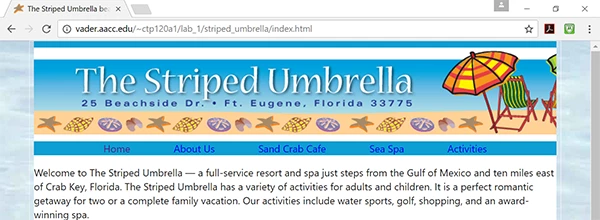
The first page looks OK to me in Firefox, Chrome and IE Edge.  See screenshot from Chrome.  Make sure your browser's zoom is at 100%.   Also clear your cache by going to the 3 dots icon.  Settings > Advanced Settings > Privacy > Clear Browsing Data.

Nancy

1 reply

Nancy OShea
Community Expert
Nancy OSheaCommunity ExpertCorrect answer
Community Expert
February 19, 2017

The first page looks OK to me in Firefox, Chrome and IE Edge.  See screenshot from Chrome.  Make sure your browser's zoom is at 100%.   Also clear your cache by going to the 3 dots icon.  Settings > Advanced Settings > Privacy > Clear Browsing Data.

Nancy

Nancy O'Shea— Product User & Community Expert
jcbailey2468
Participant
February 19, 2017

Thank you, Nancy! Clearing the browsing data fixed how it was appearing in my Chrome browser.