Known Participant
April 26, 2019
Answered

Navigation Isn't working

  • April 26, 2019
  • 4 replies
  • 939 views

Thank you in Advance!!

I have setup pages, linked the template to those pages by clicking on the "compass."

I have done this for every page (like I have in the past).

HOWEVER, this time it is not working. Can someone please help me?

Here is my code:

<!doctype html>

<html>

<head>

<meta charset="utf-8">

<!-- TemplateBeginEditable name="doctitle" -->

<title>Twisted Flow Show Supply</title>

<!-- TemplateEndEditable -->

<!-- TemplateBeginEditable name="head" -->

<!-- TemplateEndEditable -->

<style> 

.menu td { 

    text-align: center; 

    padding: 0 15px; 

.menu a { 

    color: yellow; 

    text-decoration: none; 

.menu a:hover { 

    color: white; 

    text-decoration: underline; 

.menu a.active { 

    color: red; 

</style> 

<style type="text/css">

body {

background-image: url(../Images/flame-background.jpg);

}

</style>

<link href="../CSS/TFFS layout2.css" rel="stylesheet" type="text/css">

</head>

<body>

<div class="container">

<div class="logo">

  <div align="center"><img src="../Images/website logo.JPG" width="351" height="214" alt="TWSS website logog"></div>

      <div class="sang">

        <div align="center">Be Original</div>

        <div class="navigation"><table width="100%" border="2">

  <tr>

    <td><div align="center"><a href="../index.html">Home</a></div></td>

    <td><div align="center"><a href="file:///C|/Users/Owner/Desktop/Web Sites/Twisted Flow Show Supply TFSS/products.html">Products</a></div></td>

    <td><div align="center"><a href="file:///C|/Users/Owner/Desktop/Web Sites/Twisted Flow Show Supply TFSS/awards.html">Awards</a></div></td>

    <td><div align="center"><a href="file:///C|/Users/Owner/Desktop/Web Sites/Twisted Flow Show Supply TFSS/combs.html">Combs</a></div></td>

    <td><div align="center"><a href="file:///C|/Users/Owner/Desktop/Web Sites/Twisted Flow Show Supply TFSS/blow dryers.html">Blow Dryers</a></div></td>

    <td><div align="center"><a href="file:///C|/Users/Owner/Desktop/Web Sites/Twisted Flow Show Supply TFSS/powder coating.html">Powder Coating</a></div></td>

    <td><div align="center"><a href="file:///C|/Users/Owner/Desktop/Web Sites/Twisted Flow Show Supply TFSS/contact.html">Contact</a></div></td>

    <td><div align="center"><a href="file:///C|/Users/Owner/Desktop/Web Sites/Twisted Flow Show Supply TFSS/shop.html">Shop</a></div></td>


  </tr>

</table></div>

        <p align="center"><img src="../Images/american flag.jpg" alt="American Flag" width="138" height="82" align="middle"></p>

        <p align="center">Our products are proudly made in America <br>

          All raw materials are purchased locally or through US companies <br>

          Motors are purchased from a US company

        </p>

        <div class="information">

          <div align="right">

      <hr width="1000" size="2" noshade>

    <p>

      </p>

  </div>

      <div class="content"><!-- TemplateBeginEditable name="ContentArea" --><!-- TemplateEndEditable --></div>

  </div>

      <div class="footer">

        <hr width="1000" size="2" noshade>

        <h2><a href="https://www.facebook.com/twistedflowshowsupply"><img src="file:///C|/Users/Owner/Desktop/Web Sites/Twisted Flow Show Supply TFSS/Images/Facebook Link.jpg" width="176" height="52" alt="Facebook Link" longdesc="https://www.facebook.com/twistedflowshowsupply"></a> <em>more photos of products are available on Facebook</em>!</h2>

        <p>Copyrighted 2019. All rights reserved.</p>

        <p>Website designed and managed by Janelle Sack.</p>

        <p>Patent Information:<BR>

Blow Dryer: 8,631,767<BR>

Combs: D704,905 and other patents pending</p>

        <p>Policies and Notifications<br>

          Twisted Flow is no responsible for fires caused by altering the design of the dryer or the hoses.<br>

          Not responsible for damages caused by the 1.5&quot;

        end whip being longer than 6'        </p>

      </div>

    </div>

  </div>

</div>

</div>

<p> </p>

</body>

</html>

This topic has been closed for replies.
Correct answer Nancy OShea

Please explain what is not working.

Are you receiving error messages?

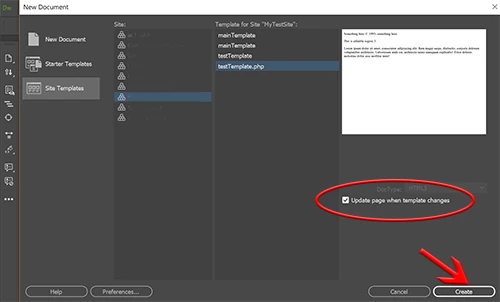
As a test, go to File > New > Site Templates.  Pick a site & template.dwt.  Hit Create button.  See screenshot.

Be sure to check the box that says Update page when Template changes.
Save & name your newly created child page.
Did it work?

4 replies

Legend
April 30, 2019

As Nancy says links are pointing to local files on your computer, as Dreamweaver template files are in a sub folder the links in your template file should be changed like the example below (assuming all the pages are in your root folder), save the template and update all pages linked to it:

<table width="100%" border="2">

  <tr>

    <td><div align="center"><a href="../index.html">Home</a></div></td>

    <td><div align="center"><a href="../products.html">Products</a></div></td>

    <td><div align="center"><a href="../awards.html">Awards</a></div></td>

    <td><div align="center"><a href="../combs.html">Combs</a></div></td>

    <td><div align="center"><a href="../blow dryers.html">Blow Dryers</a></div></td>

    <td><div align="center"><a href="../powder coating.html">Powder Coating</a></div></td>

    <td><div align="center"><a href="../contact.html">Contact</a></div></td>

    <td><div align="center"><a href="../shop.html">Shop</a></div></td>


  </tr>

</table>

You should only really be using tables for data these days, but thats a different issue ...

Paul-M - Community Expert
jgoetz03Author
Known Participant
April 30, 2019

Here is the file setup when I look up the web files on my computer

When I click on the

And select which file I want

That's the files DW sets up. I know it's doing what I'm telling it too, but HOW do I fix this?

Thank you!

Nancy OShea
Community Expert
Community Expert
April 30, 2019

You have a lot of code errors in your markup, some of them are critical.  DW does not like code errors.  You should fix those first.

Showing results for http://www.twistedflow.com/ - Nu Html Checker

Nancy O'Shea— Product User & Community Expert
Nancy OShea
Community Expert
Nancy OSheaCommunity ExpertCorrect answer
Community Expert
April 26, 2019

Please explain what is not working.

Are you receiving error messages?

As a test, go to File > New > Site Templates.  Pick a site & template.dwt.  Hit Create button.  See screenshot.

Be sure to check the box that says Update page when Template changes.
Save & name your newly created child page.
Did it work?
Nancy O'Shea— Product User & Community Expert
jgoetz03Author
Known Participant
April 29, 2019

When you go to my actual website, www.twistedflow.com, the navigation will not do anything once clicked. I cannot change pages or anything.

Nancy OShea
Community Expert
Community Expert
April 29, 2019
  1. Your navigation is broken because the links in your site's Templates/TFSS.dwt are pointing to files on your local computer.  They will remain broken until you remove the code shown below in red.  
    <a href="file:///C|/Users/Owner/Desktop/Web Sites/Twisted Flow Show Supply TFSS/products.html">Products</a>
  2. Repeat with other links. 
  3. Save template.
  4. Populate changes to child pages.
  5. Upload all child pages to your server.
Nancy O'Shea— Product User & Community Expert
jgoetz03Author
Known Participant
April 26, 2019

Yes I believe this is correct

B i r n o u
Legend
April 26, 2019
  • did you define a website
  • did you save that file , or is it still unsaved ?

what seams curious and should be corrected any way... (not related to your question)

  • your folders names use white space Web Sites/Twisted Flow Show Supply TFSS
    you shouldn't and opt for renaming your folders
    Web_Sites and Twisted_Flow_Show_Supply_TFSS
  • idem for your image name
    Facebook Link.jpg
    should be Facebook_Link.jpg or FacebookLink.jpg
jgoetz03Author
Known Participant
April 29, 2019

What if I just rename the folder to TFSS instead of adding the _?