Participant
February 12, 2017
Answered

need help / advice on setting up my DW CC2017 website

  • February 12, 2017
  • 3 replies
  • 561 views

1. Take it my 1st step is to define website?

2. I want to create a website to suit all screen sizes, so do I use bootstrap to make my template and all other pages thereafter?

3. Since there are 3 screen sizes - when I create my page using the larger size, do I save each page 3 times (with same page title) and do I then end up with 3 of every page in the right H/S column under website?

4.I haven't a clue about html - I just enter a table with the 4 or 6 columns across - in the editable region and enter images in them with some text - will this still work in CC2017?

PLEASE PLEASE HELP. Thank you.

This topic has been closed for replies.
Correct answer Nancy OShea

1. Take it my 1st step is to define website?


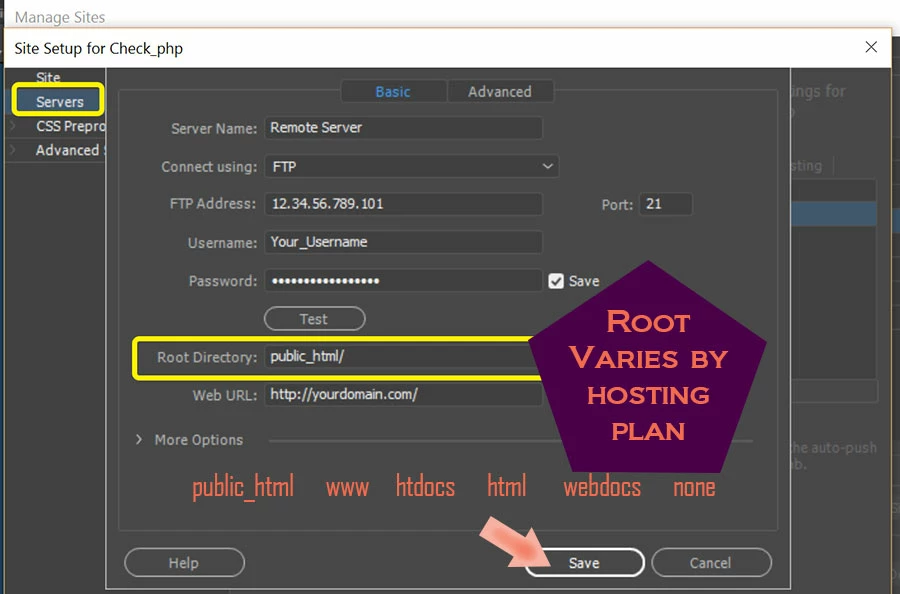
      Yes.  And add your web server's FTP log-in credentials and root directory. Contact your web host for details.

2. I want to create a website to suit all screen sizes, so do I use bootstrap to make my template and all other pages thereafter?


     Yes, you could use Bootstrap.  But you need to understand HTML &  CSS classes and have a working knowledge of how Bootstrap's 12-box grid system works.

3. Since there are 3 screen sizes - when I create my page using the larger size, do I save each page 3 times (with same page title) and do I then end up with 3 of every page in the right H/S column under website?


  No.  One web site is all you need.  But it must be built responsively to work on various screen sizes xs, sm, md, lg.

4.I haven't a clue about html - I just enter a table with the 4 or 6 columns across - in the editable region and enter images in them with some text - will this still work in CC2017?

     No.  Tables are not responsive.   And if you don't know anything about HTML, you have some homework to do before you can build a website in Dreamweaver.

Nancy

3 replies

Nancy OShea
Community Expert
Nancy OSheaCommunity ExpertCorrect answer
Community Expert
February 12, 2017

1. Take it my 1st step is to define website?


      Yes.  And add your web server's FTP log-in credentials and root directory. Contact your web host for details.

2. I want to create a website to suit all screen sizes, so do I use bootstrap to make my template and all other pages thereafter?


     Yes, you could use Bootstrap.  But you need to understand HTML &  CSS classes and have a working knowledge of how Bootstrap's 12-box grid system works.

3. Since there are 3 screen sizes - when I create my page using the larger size, do I save each page 3 times (with same page title) and do I then end up with 3 of every page in the right H/S column under website?


  No.  One web site is all you need.  But it must be built responsively to work on various screen sizes xs, sm, md, lg.

4.I haven't a clue about html - I just enter a table with the 4 or 6 columns across - in the editable region and enter images in them with some text - will this still work in CC2017?

     No.  Tables are not responsive.   And if you don't know anything about HTML, you have some homework to do before you can build a website in Dreamweaver.

Nancy

Nancy O'Shea— Product User & Community Expert
Ussnorway7605025
Legend
February 12, 2017

1. Take it my 1st step is to define website?

what is this web site going to do for you i.e, a shop, a blog... just someplace the store family photos?

rudy_11Author
Participant
February 12, 2017

Just a website to advertise Alloy Wheels and give details of sizes and prices in columns next to the images. It is not for the purpose of "selling online" - just advertising designs available.

BenPleysier
Community Expert
Community Expert
February 12, 2017

This will help you on your way Design responsive websites using Bootstrap

Wappler is the DMXzone-made Dreamweaver replacement and includes the best of their powerful extensions, as well as much more!
rudy_11Author
Participant
February 12, 2017

Thank you Ben. Still need to know answers to questions 1 & 2 to get me started and then I can hopefully take it from there.

Legend
February 12, 2017

Question 2 has been answered by the use of Bootstrap - a responsive framework but be warned it's complex to work with for a beginner.