Participant
September 16, 2020
Answered

Need help with find and replace expressions

  • September 16, 2020
  • 1 reply
  • 388 views

Hi,

I have over 500 div tags with various page ids. 

Example:

<div id="page_5">
<div id="id5_1">
<div id="id5_2">
<div id="page_6">
<div id="id6_1">

What expression in the search and replace can I use to remove ALL div tags?

Thanks

    This topic has been closed for replies.
    Correct answer Nancy OShea

    You don't need regular expressions to remove <div> tags.

    NOTE:  Back up your site folder before you perform a site wide Find & Replace because you cannot Undo this.


    Use Ctrl + Shift + F.

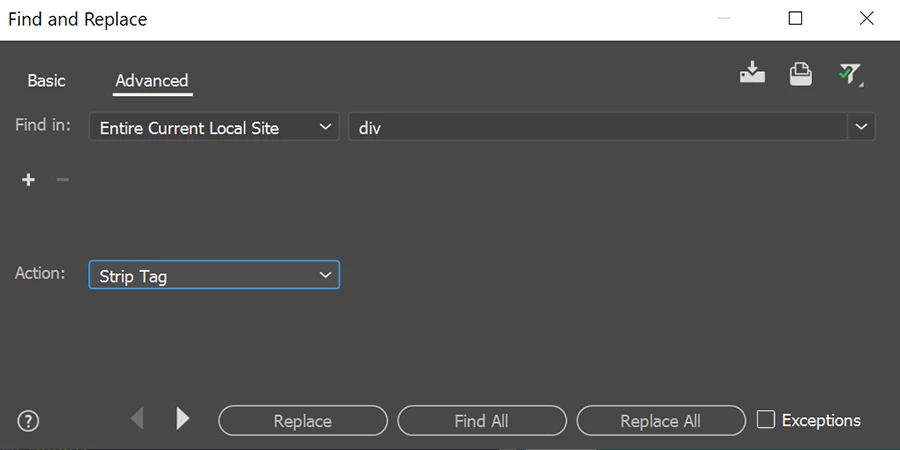
    Click on Advanced tab.  See screenshot.

    This will remove ALL divsion tags from your markup.  To refine your search, Click the + sign and add an ID attribute.


    Post back if you have any questions.


    1 reply

    Nancy OShea
    Community Expert
    Nancy OSheaCommunity ExpertCorrect answer
    Community Expert
    September 17, 2020

    You don't need regular expressions to remove <div> tags.

    NOTE:  Back up your site folder before you perform a site wide Find & Replace because you cannot Undo this.


    Use Ctrl + Shift + F.

    Click on Advanced tab.  See screenshot.

    This will remove ALL divsion tags from your markup.  To refine your search, Click the + sign and add an ID attribute.


    Post back if you have any questions.


    Nancy O'Shea— Product User & Community Expert
    Participant
    September 17, 2020

    Hi Nancy,

    You're simply amazing!  That worked!  Thanks so much.

    Nancy OShea
    Community Expert
    Community Expert
    September 17, 2020

    You're welcome.  Glad it worked for you 🙂


    Nancy O'Shea— Product User & Community Expert