Hi Ben!
Thank you for your help and your example. I see what you are saying. I have tried to install his extension manager but am running into issues. I will revisit and see why in a few. The issue I am having is being able to have all the "monday items to fall under monday" if that makes sense. I looked on github for over an hour and found nothing with that option.
I deleted my original code link but put it back up. I would think it's a matter of how I have the rows and columns grouped?
http://offers.premierinc.com/table-delete_table-delete.html
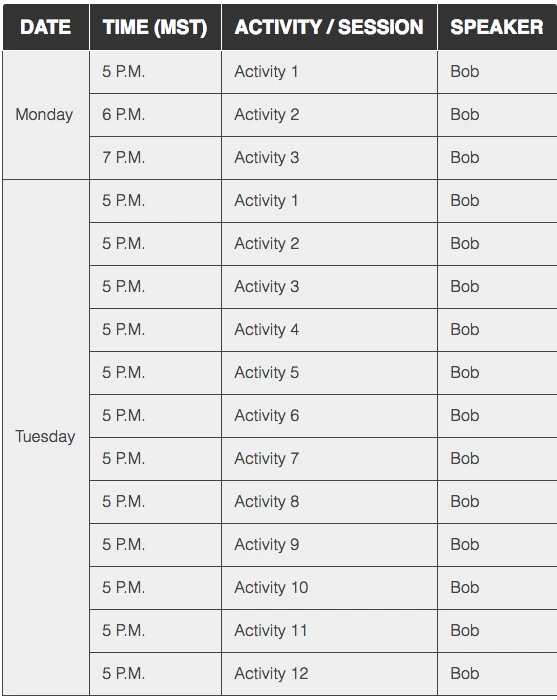
This one was photoshopped.
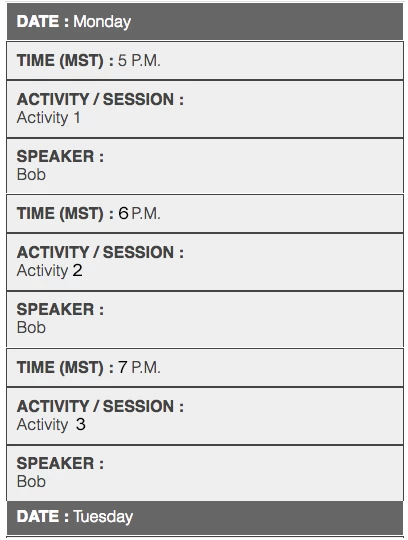
Try the code below, based on the Codepen example. I think that is what you want.
There are some non-breaking spaces in the code - & nbsp; (make sure you ajoin the & and n ( ) - Forum wont show non-breaking spaces.
<!DOCTYPE >
<html>
<head>
<meta charset="UTF-8" />
<title>Timetable</title>
<style>
.timetable {
border-collapse: collapse;
border: 1px solid #000;
width: 60%;
margin: 0 auto;
}
.timetable td {
font-family: helvetica;
border: 1px solid #000;
padding: 10px;
background-color: #f2f2f2;
}
.desktop th {
font-family: helvetica;
text-align: left;
background-color: #000;
color: #fff;
padding: 10px;
}
.mobile {
display: none;
}
.timetable .border_none {
border-bottom: 1px solid #f2f2f2;!important
}
@media screen and (max-width: 768px) {
table, thead, tbody, th, td, tr {
display: block;
}
.display-none {
display: none;
}
.mobile {
display: block;
}
.mobile th {
font-family: helvetica;
text-align: left;
background-color: #666;
color: #fff;
padding: 10px;
}
tr {
margin: 0 0 0 0;
}
tr:nth-child(odd) {
background: #ccc;
}
.timetable td {
border: none;
border-bottom: 1px solid #eee;
position: relative;
padding-top: 6px;
padding-bottom: 6px;
padding-left: 50%;
background-color: transparent;
}
.timetable td:before {
position: absolute;
top: 0;
left: 6px;
width: 45%;
padding-right: 10px;
padding-top: 6px;
white-space: nowrap;
}
td:nth-of-type(2):before { content: "Time (MST)"; }
td:nth-of-type(3):before { content: "Activity/Session"; }
td:nth-of-type(4):before { content: "Speaker"; }
}
</style>
</head>
<body>
<table class="timetable">
<tr class="mobile">
<th>Day: Monday</th>
</tr>
<tr class="display-none desktop">
<th class="display-none ">Date</th>
<th>Time</th>
<th>Activity/Session</th>
<th>Speaker</th>
</tr>
<tr>
<td class="display-none border_none">& nbsp;</td>
<td>5pm</td>
<td>Activity 1</td>
<td>Bob</td>
</tr>
<tr>
<td class="border_none display-none">Monday</td>
<td>6pm</td>
<td>Activity 2</td>
<td>Bob</td>
</tr>
<tr>
<td class="display-none">& nbsp;</td>
<td>7pm</td>
<td>Activity 3</td>
<td>Bob</td>
</tr>
<tr class="mobile">
<th>Day: Tuesday</th>
</tr>
<tr>
<td class="display-none border_none">& nbsp;</td>
<td>5pm</td>
<td>Activity 1</td>
<td>Bob</td>
</tr>
<tr>
<td class="display-none border_none">& nbsp;</td>
<td>5pm</td>
<td>Activity 2</td>
<td>Bob</td>
</tr>
<tr>
<td class="border_none display-none">Tuesday</td>
<td>5pm</td>
<td>Activity 3</td>
<td>Bob</td>
</tr>
<tr>
<td class="display-none border_none">& nbsp;</td>
<td>5pm</td>
<td>Activity 4</td>
<td>Bob</td>
</tr>
<tr>
<td class="display-none border_none">& nbsp;</td>
<td>5pm</td>
<td>Activity 5</td>
<td>Bob</td>
</tr>
<tr>
<td class="display-none">& nbsp;</td>
<td>5pm</td>
<td>Activity 1</td>
<td>Bob</td>
</tr>
</table>
</body>
</html>




 AdChoices