
Participating Frequently
July 16, 2019
Answered

Need Regex Help

  • July 16, 2019
  • 5 replies
  • 516 views

Question:  How do I get a regex wildcard to select only between the two nearest elements instead of going on to further similar elements?

I have a VERY long list of names that need to have the last name separated from the rest by a tab character.  In order to accomplish this, I've inserted a placeholder character (#) just before the return of each line, and replaced all spaces in the names with a different placeholder character (@) for my regex to reference.  These names are all first, middle initial, then last, having a space on each side of the middle initial.  So, with my placeholder characters inserted, the list looks like this (short sample):

Edward@C.@Sellner#

James@J.@Megivern#

J.@Philip@Newell#

I need to replace the @ placeholder just before the last name with a tab.  When I try and do that, my regex is selecting everything between the # placeholder and the first @ placeholder, instead of stopping at the seconds @ placeholder just before the last name.  Here's what I'm using in my search:

@([\s\S]*?)#

which I would replace with:

(tab)$1#

after which I would convert all placeholders back to their original state.

The problem is that this regex is going to the first @ placeholder instead of stopping at the one just before the last name.
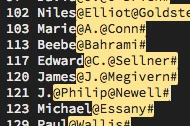
What should I be doing differently here?

Thanks.

This topic has been closed for replies.
Correct answer WolfShade

Cayce​, was this of any assistance to you?  Just curious.

V/r,

^ _ ^

5 replies

WolfShade
WolfShadeCorrect answer
Legend
July 18, 2019

Cayce​, was this of any assistance to you?  Just curious.

V/r,

^ _ ^

CayceAuthor
Participating Frequently
July 18, 2019

Thanks, WolfShade!  Great help!

WolfShade
Legend
July 19, 2019

You're welcome.  And thank you for marking my answer as correct.  I do appreciate it.

V/r,

^ _ ^

WolfShade
Legend
July 17, 2019

Okay, I've got it.  But I also just discovered a bug in how Dw implements the replace.

IF YOU USE REPLACE ALL, IT WORKS.  If you hit 'Replace' for just a single instance and do it repeatedly, it will skip lines.   ???

Anyhoo.. my final solution:

Edward@C.@Sellner#

James@J.@Megivern#

J.@Philip@Newell#

FIND using REGEX:  ([^@]{1,})(@)([^@]{1,})(@)([^#]{1,}#)

REPLACE:  $1$2$3    $5  (This is with four spaces, as a tab cannot be used as part of the replace.)

REPLACE ALL command:

Edward@C.    Sellner#

James@J.    Megivern#

J.@Philip    Newell#

REPLACE one at a time:

Edward@C.    Sellner#

James@J.@Megivern#

J.@Philip    Newell#

HTH,

^ _ ^

WolfShade
Legend
July 17, 2019

Actually, I did not quite think my solution all the way through.    The backreference should not be around the @.  There should be two of them around everything else, and manually insert the tab.

I will play with it some more, and post my final suggestion.

V/r,

^ _ ^

WolfShade
Legend
July 17, 2019

Okay.. I was trying to use lookbehinds, but couldn't get it to work.

If you are trying to do this in Dw, use the following:

(@)[^@]*#[\r\n]

Looking for an @ followed by one or more of anything that isn't @ followed by # with a line feed.  The parenthesis around the first @ is a backreference ($1) that can be replaced with the tab that you want.

HTH,

^ _ ^

B i r n o u
Legend
July 17, 2019

always impressive on regex as usual...

WolfShade
Legend
July 17, 2019

Merci, Birnou. 

V/r,

^ _ ^

WolfShade
Legend
July 16, 2019

Honestly, this should not be working at all due to \s\S (anything that is a whitespace or anything that isn't a whitespace.)

Let me play around with this a bit.  I _love_ RegEx challenges.. usually. 

V/r,

^ _ ^

WolfShade
Legend
July 16, 2019

BTW.. you don't mention if this is a single string, or an array, or what.  What is the context for this RegEx need?

V/r,

^ _ ^