Participant
October 7, 2017
Answered

Need to import an existing site [Edited for brevity]

  • October 7, 2017
  • 1 reply
  • 416 views

I have just subscribed for access to Dreamweaver CC. I have an already existing web site out on my ISP's server. Due to a major system crash here, I no longer have any local copies of the site. I need to be able to connect to my ISP's server and import the existing files here so that I can get to work updating and maintaining the site. Please steer me in the right direction to be able to accomplish this. Thank you in advance for any assistance/guidance you can provide.

Mark

    This topic has been closed for replies.
    Correct answer Nancy OShea

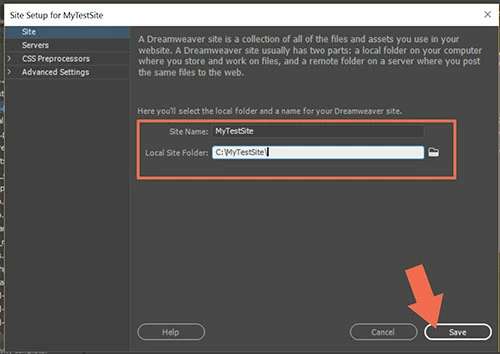
    Go to Site > New Site and create a folder on your hard drive for your site files.  Example, C:\MyTestSite.  See screenshots.

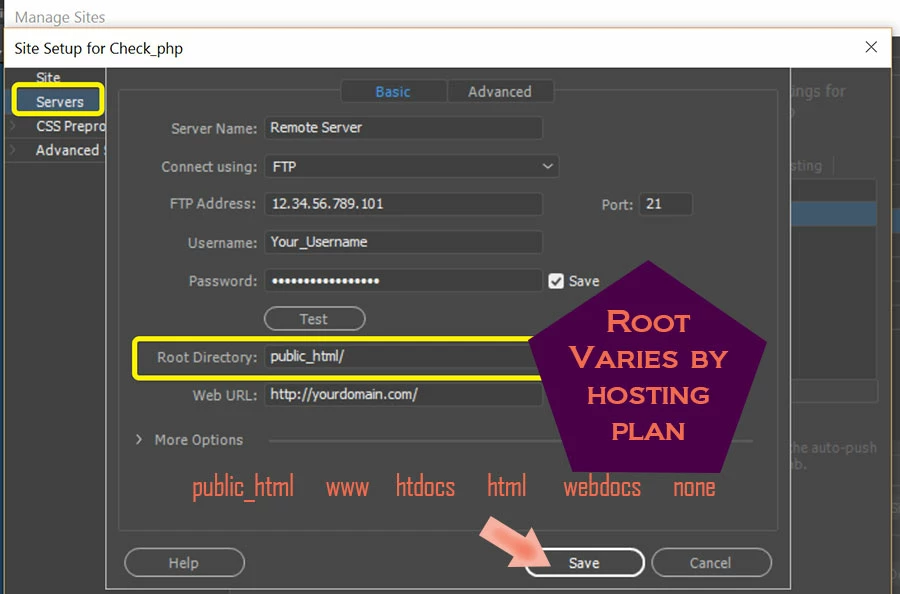
    Under the Servers Tab, enter your server's FTP log-in credentials and root directory.  If unsure, contact you hosting provider.

    When done, hit the TEST button to check connection.

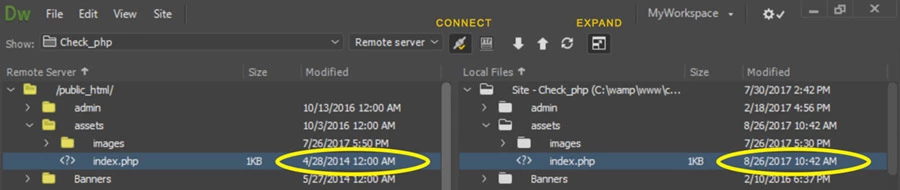
    Assuming everything is working, expand your Files Panel, hit the Connect button.  Use the Down arrow to GET files from Remote Server to Local Files folder

    1 reply

    Nancy OShea
    Community Expert
    Nancy OSheaCommunity ExpertCorrect answer
    Community Expert
    October 7, 2017

    Go to Site > New Site and create a folder on your hard drive for your site files.  Example, C:\MyTestSite.  See screenshots.

    Under the Servers Tab, enter your server's FTP log-in credentials and root directory.  If unsure, contact you hosting provider.

    When done, hit the TEST button to check connection.

    Assuming everything is working, expand your Files Panel, hit the Connect button.  Use the Down arrow to GET files from Remote Server to Local Files folder

    Nancy O'Shea— Product User & Community Expert