imadomeri
Participant
May 20, 2022
Question

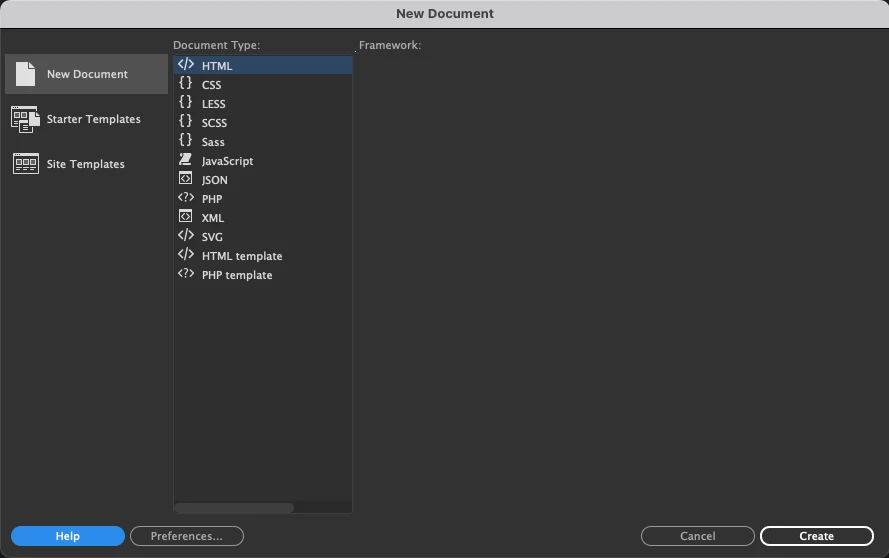
New Html Panel does not exist

  • May 20, 2022
  • 3 replies
  • 305 views

When I try to create a new html file, the window doesn't show me anything.
I have re-downloaded the program several times and also tried old versions and the problem still exists
Please Help

    This topic has been closed for replies.

    3 replies

    imadomeri
    imadomeriAuthor
    Participant
    May 21, 2022


    Hi, after 14 working hours, I tried everything and it didn't work so I did the following tests

    Reset macbook to factory settings

    • Big sure system download
    • Dreamweaver 20.2.1 (working)
      All other Adobe programs need to upgrade or you must download old versions 😞


    • OS update for Catalina 10.15.7
    • Dreamweaver 20.2.1 is not working
    • Dreamweaver 21 is not working
    • Dreamweaver 21.1 is not working
    • Dreamweaver 21.2 is not working


    Reset the Macbook back one more time to factory settings:
    01 Hard disk partitioning

    • OS 11 Big sure
    • Dreamweaver 20.2.1 (working) and that's what I need here

    02 Hard disk partitioning

    • OS 12 Monterey
    • Dreamweaver 21.2 is not working but all Adobe programs with new versions work and that's what I need here 🙂

    Thanks guys


    Nancy OShea
    Community Expert
    Community Expert
    May 21, 2022

    According to the system requirements, current Adobe software should work on all of these operating systems.  Make sure your computer meets the minimum CPU & GPU requirements.

    • Windows 10 versions 21H2, 21H1, 20H2, 2004, and 1909 (LTSB branches are not supported;)
    • macOS 12 (Monterey), macOS 11 (Big Sur), macOS 10.16 or 10.15 (Catalina).

    https://helpx.adobe.com/creative-cloud/system-requirements.html

    If you have an Apple M1 chip, you may need Rosetta 2 to support installers & 3rd party plugins.


    https://helpx.adobe.com/download-install/kb/apple-silicon-m1-chip.html


    Nancy O'Shea— Product User & Community Expert
    imadomeri
    imadomeriAuthor
    Participant
    May 23, 2022

    Hi,

    i have MacBook Pro (15-inch, 2017)

    • 2,8 GHz Quad-Core Intel Core i7
    • 16 GB 2133 MHz LPDDR3
    • Radeon Pro 560 4 GB | Intel HD Graphics 630 1536 M


    So far I don't know where the problem is, but version 20.2.1 works with OS Big sure.
    Either any version with Catalina or Monterey not working, and sometimes a message appears when the program is launched

    Jon Fritz
    Community Expert
    Community Expert
    May 20, 2022

    That looks like an installation problem.

    Have you tried restoring preferences or uninstalling and reinstalling yet?

    imadomeri
    imadomeriAuthor
    Participant
    May 20, 2022

    The problem appeared from the first download, I did not use the Dreamweaver before, I changed the version to an older one several times and the problem remained despite the system update.

    Nancy OShea
    Community Expert
    Community Expert
    May 20, 2022

    Use Adobe Cleaner Tool to wipe old software off your system.

    https://helpx.adobe.com/creative-cloud/kb/cc-cleaner-tool-installation-problems.html


    Download and install Creative Cloud followed by latest Dreamweaver.

    Restart your computer.


    Nancy O'Shea— Product User & Community Expert
    Community Expert
    May 20, 2022

    What OS are you using? Can you try a new user account or guest user account on the system to see if the issue exists outside of this profile?

    imadomeri
    imadomeriAuthor
    Participant
    May 20, 2022

    thanks, I was working on Sur 11.6 and thought the problem was from the system or incompatibility between adobe and mac, then I upgraded the system to the current version Monterey 12.4 and the problem is still there.

    Community Expert
    May 21, 2022

    The thought I was having was a corrupt OS user profile. This could have happened even prior to the upgrade.  The OS and user accounts are independent of one another.  Can you try logging in as another user or a guest to see if the problem persists?