


Inspiring
May 1, 2017
Answered

New Recurring Error Warning

  • May 1, 2017
  • 1 reply
  • 405 views

[Mac OS 10.12.4; DW CC 17]

Hello:

On every one of my .php pages that I open in DW, I now get an error warning that offers a Retry solution. Unfortunately, when I click Retry, the error message disappears and instantly reappears.     (   ; - )
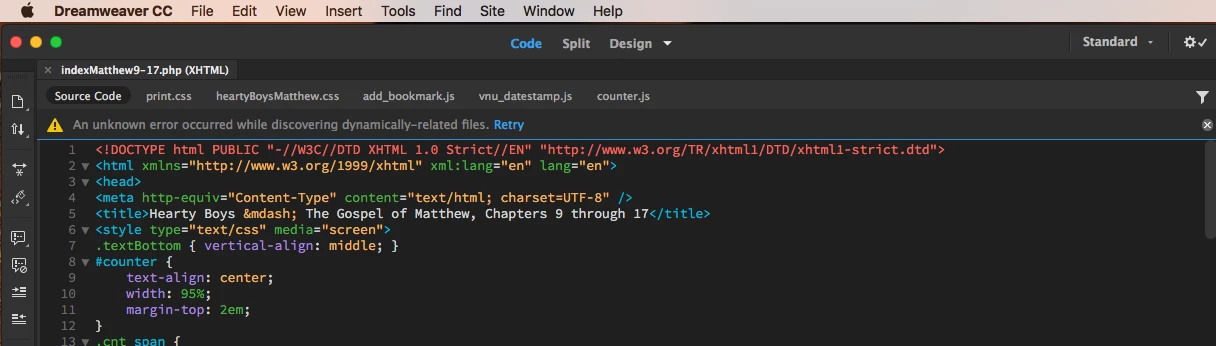
How does this get corrected???

Warren

    This topic has been closed for replies.
    Correct answer wcamp

    Hello again and thanks, PZ.

    I found its cause.

    As I was following your initial suggesting to verify the site file's definition, I noticed that I hadn't turned ON the XAMPP localhost manager. After turning it on, I opened several pages without getting that message.

    Seems that DW would want to update its default error warning to include a suggestion to activate the localhost server.

    Nevertheless, PZ, I thank you for your prompt and helpful e-reply.

    Warren

    1 reply

    pziecina
    Legend
    May 1, 2017

    This is normally associated with an incorrect site definition.

    Check that your site definition is pointing to the correct folder, including for your testing server. If it is, and you still get the error try pointing it to a folder above or below than it currently does.

    wcampAuthorCorrect answer
    Inspiring
    May 1, 2017

    Hello again and thanks, PZ.

    I found its cause.

    As I was following your initial suggesting to verify the site file's definition, I noticed that I hadn't turned ON the XAMPP localhost manager. After turning it on, I opened several pages without getting that message.

    Seems that DW would want to update its default error warning to include a suggestion to activate the localhost server.

    Nevertheless, PZ, I thank you for your prompt and helpful e-reply.

    Warren