


Inspiring
October 9, 2017
Answered

New Site | Define Remote Site Location

  • October 9, 2017
  • 1 reply
  • 388 views

I've done this so many times in the past, but now cannot remember how. I just created a new web site (actually am rebuilding an existing one; all content on local and remote-server locations is already in place). I just cannot remember how to navigate to the location within D-W, that allows me to input the server name and path for the remote content.

With thanks in advance,

jwc
This topic has been closed for replies.
Correct answer lnayal

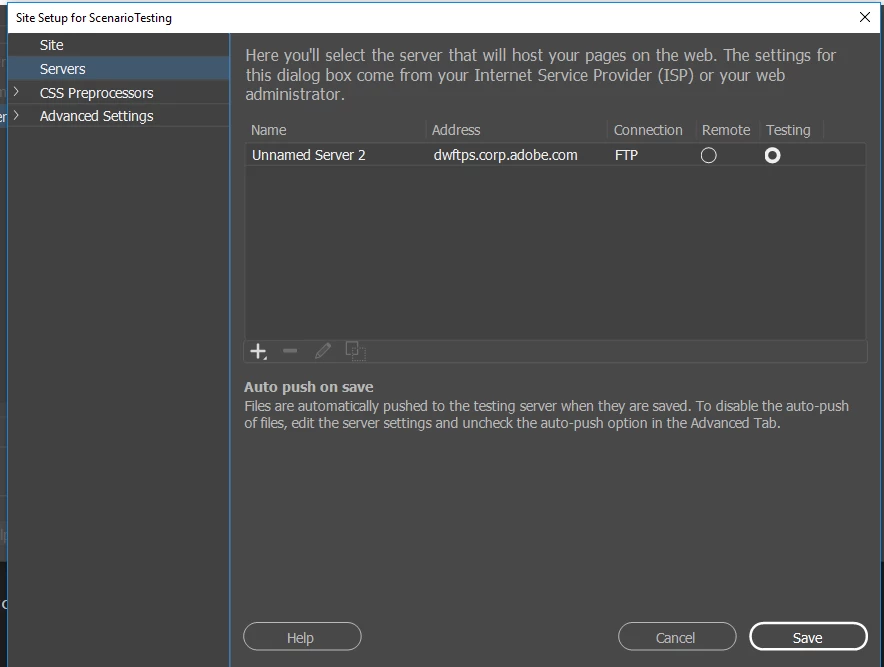
I think you are looking for site setup dialog. You can get it from menu site > Manage Sites > Double click site which you want to edit and choose server tab and you can add a new server or edit the existing one.

Let us know if you have more questions.

-Lalita

1 reply

lnayalCorrect answer
Participating Frequently
October 9, 2017

I think you are looking for site setup dialog. You can get it from menu site > Manage Sites > Double click site which you want to edit and choose server tab and you can add a new server or edit the existing one.

Let us know if you have more questions.

-Lalita