



johnmackinnonphotography
Inspiring
February 12, 2017
Answered

Newbie with code issues

  • February 12, 2017
  • 2 replies
  • 677 views

Good afternoon.

I am very new to DW and I am having a an issue with one of my divs and positioning the information held within it.  I can't seem to get the text to position at the top left. (see img)
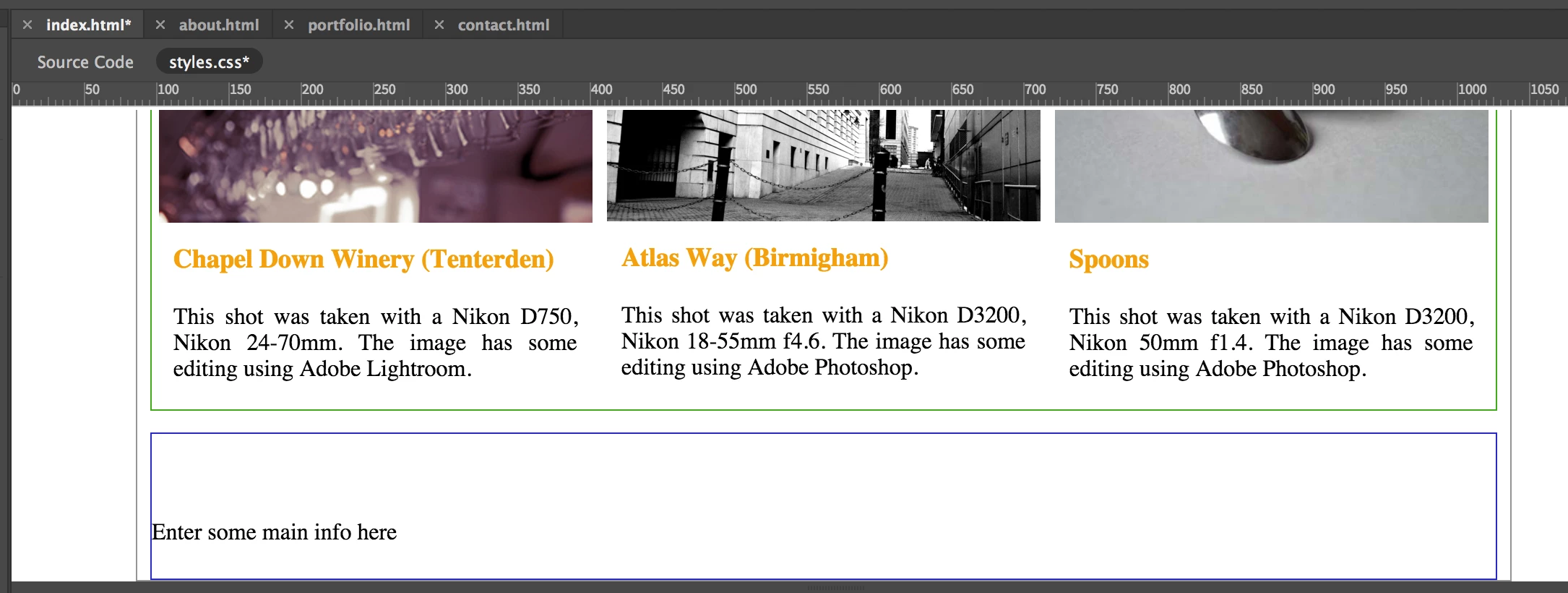
This is my code:

HTML:

</div> 

       <div id="main-info">

            Enter some main info here  

</div>

CSS:

#main-info {

    width: 930px;

    height: 100px;

    border: 1px solid #2827CF;

    margin: auto;

    margin-top: 15px;

}

I know you folks will be all over this and I thank you for your assistance.

Regards

J

This topic has been closed for replies.
Correct answer Nancy OShea

Hi Nancy

should I just make them auto then?

Cheers

John


Nope.  No height property necessary. The default height of a container is always auto or 100% of the body content anyway.  So it's not necessary to state it.

The only time you really need the height property is when you want to put restrictions on the container size.   Or in rare cases for a hack.

Nancy

2 replies

johnmackinnonphotography
Inspiring
February 20, 2017

Hi again...

Would it be possible for someone to have a look over my code again please?  I am trying to get a border shadow around the boxes but i am not sure what the problem is. I was getting an error with regards to "border-shadow" coming after the -webkit-shadow.....

Many thanks for your help.

HTML:

<!doctype html>

<html>

<head>

<meta charset="UTF-8">

<title>Contact</title>

<link href="css/styles.css" rel="stylesheet" type="text/css">

</head>

<body>

    <div class="wrap">


        <header class="header">

            John MacKinnon Photography

        </header>


        <nav class="menu">

            <ul>

                <li><a href="index.html">Home</a></li>

                <li><a href="about.html">About</a></li>

                <li><a href="portfolio.html">Portfolio</a></li>

                <li><a href="contact.html">Contact</a></li>

            </ul>

        </nav>


        <div class="main1">

            <p class="above-phots">How do you get in touch</p><br>


            <p class="contact-info">Please use the contact form below if you would like a competative quote any photographic work I might be able to help with If I am unable to assist I may be able to point you in the right direction of someone who can.</p>


        <div class="contact">

               <form action="/action_page.php">

              <fieldset class="fieldset">

                <legend class="legend">Personal information:</legend>

                <br>

                <form class="form">

                    <p class="name">

                        <input type="text" name="name" id="name" placeholder="John Doe" />

                        <label for="name">Name:</label>

                    </p>

                    <br>


                    <p class="email">

                        <input type="text" name="email" id="email" placeholder="mail@somewhere.com" />

                        <label for="email">Email address:</label>

                    </p>

                    <br>


                    <p class="text">

                        <textarea name="text" placeholder="Type something to me"></textarea>

                        <label for="email">Question / Message:</label>

                    </p>

                    <br>


                    <p class="submit">

                        <input type="submit" value="Send" />

                    </p>


                </form>

              </fieldset>

            </form>


        </div>


        </div>


    <div class="footer">

            <p class="copyright_text">&copy; copyright 2017 <a href="http://www.jmacphot.com">JMacPhot.com</a>.<br>Designed and Developed by John MacKinnon</p>

            <ul class="social">

                <li><a href="https://twitter.com/John_MacKinnon5">Twitter.</a></li>

                <li><a href="#">Facebook.</a></li>

                <li><a href="https://uk.linkedin.com/in/john-mackinnon-04318470">Linkedin.</a></li>

                <li><a href="https://500px.com/johnmackinnon">500px.</a></li>

            </ul>

        </div>


    </div>

</body>

</html>

CSS:

* {

    margin: 0px;

    padding: 0px;

}

body {

    font-family:"Gill Sans", "Gill Sans MT", "Myriad Pro", "DejaVu Sans Condensed", Helvetica, Arial, "sans-serif";

}

.wrap {

    border: 1px solid #949393;

    height: auto;

    width: 950px;

    margin: auto;   

}

.header {

    background-color: #949393;

    height: 80px;

    text-align: center;

    font-weight: 300;

    font-size: 75px;

}

.menu {

    font-size: 10px;

    text-decoration: none;

    background-color: #949393;

    height: 50px;

    text-align: center;

}

.menu ul {

    list-style: none;

}

.menu ul li {

    display: inline-block;

    font-size: 25px;

    margin: 10px;

}

.menu ul li a:hover {

    color: #D0CDCD;

}

a:hover, a:visited, a:link, a:active {

    text-decoration: none;

    color:#F4A00E;

}

.main1 {

    width: 930px;

    height: 800px;

    border: 0px solid #3CAF19;

    margin: auto;

    margin-top: 15px;

}

.img-single {

    height: 200px;

    width: 300px;

}

.first {

    /*background-color: #F60C10;*/

    float: left;

    width: 300px;

    height: 300px;

    margin: 5px;

}

.above-phots {

    font-size: 20px;

    padding: 5px;

    font-weight: 300;

    text-align: center;   

}

.title {

    color: #F4A00E;

    font-size: 18px;

    font-weight: bold;

    padding: 10px;

}

.content {

    text-align: justify;

    font-size: 16px;

    font-weight: 300;

    padding: 10px;   

}

.second {

    /*background-color: #F60C10;*/

    float: left;

    width: 300px;

    height: 300px;

    margin: 5px;

}

.third {

    /*background-color: #F60C10;*/

    float: left;

    width: 300px;

    height: 400px;

    margin: 5px;

}

.fourth {

    /*background-color: #F60C10;*/

    float: left;

    width: 300px;

    height: 200px;

    margin: 5px;

}

.fifth {

    /*background-color: #F60C10;*/

    float: left;

    width: 300px;

    height: 200px;

    margin: 5px;

}

.sixth {

    /*background-color: #F60C10;*/

    float: left;

    width: 300px;

    height: 200px;

    margin: 5px;

}

.main-info {

    width: 930px;

    height: 30px;

    border: 0px solid #2827CF;

    margin: auto;

    margin-top: 15px;

    margin-bottom: 15px;

}

.main-info-text {

    text-align: center;

    padding: 5px;

}

.seventh {

    float: left;

    margin: 5px;

}

.seventh img {

    margin: 5px;

    padding: 5px;


}

.footer {

    height: 60px;

    background-color: #949393;

    margin: auto;

    margin-top: 15px;

    border: 0px solid #3CAF19;

    text-align: center;

    font-weight: 300;

}

.copyright_text {

    width: 450px;

    margin: 10px;

    float: left;

}

.copyright_text a {

    color: #000000;

}

.social li {

    float: left;

    margin: 20px 5px 25px 25px ;

    list-style-type: inline;

    text-decoration: none;

    list-style: none;

}

.social li a {

    color: #000000;

}

.port-images {

    width: 930px;

    height: auto;

}

.contact {

    border: 0px solid #949393;

    height: 550px;

    width: 750px;

    margin: 50px auto;

}

.contact p {

    color: #949393;

}

.fieldset {

    border: 0px solid;

}

input, textarea {

    padding: 10px;

    border: 1px solid #B9B7B7;

    width: 200px;

    color: #999999;

    -moz-box-shadow: 0px 0px 0px 1px #B9B7B7;

    -webkit-box-shadow: 0px 0px 0px 1px #B9B7B7;

    box-shadow: 0px 0px 0px 1px #B9B7B7;

}

textarea {

    width: 400px;

    height: 150px;

    max-width: 450;

    line-height: 10px;

}

input:hover textarea:hover,

    input:focus textarea:focus {

    border-color: 1px solid #B9B7B7;

    -moz-box-shadow: 0px 0px 0px 1px #B9B7B7;

    -webkit-box-shadow: 0px 0px 0px 1px #B9B7B7;

    box-shadow: 0px 0px 0px 1px #B9B7B7;

}

.form label {

    margin-left: 10px;

}

.submit input {

    width: 100px;

    height: 40px;

    background-color: #504F4F;

    font-size: 16px;

    color: #FFFFFF;

}

Legend
February 20, 2017

Try:

-moz-box-shadow: 3px 3px  3px #B9B7B7;

-webkit-box-shadow: 3px 3px  3px #B9B7B7;

box-shadow: 3px 3px  3px #B9B7B7;

You are missing the measurement attribute (px) from 'max-width' in the css selector below - should be 450px

textarea {

width: 400px;

height: 150px;

max-width: 450;

line-height: 10px;

}

You have the list-style written twice in the css selector below, so choose one or the other. I assume its list-style: none; plus you don't need - text-decoration: none;

.social li {

float: left;

margin: 20px 5px 25px 25px ;

list-style-type: inline;

text-decoration: none;

list-style: none;

}

johnmackinnonphotography
Inspiring
February 20, 2017

Osgood

many thanks for looking over my code. I will input your suggestions and let you know how I get on.

Regards

J

johnmackinnonphotography
Inspiring
February 12, 2017

Please ignore the above question as I have managed to solve it myself (always the best way).

Some of the divs further up the page, due to the height I had set them to were stopping the text from getting to the position I wanted it.

Nancy OShea
Community Expert
Community Expert
February 12, 2017

Don't use explicit height values on containers.  You don't need them.  Web page height is always determined by content, not height values.

Nancy

Nancy O'Shea— Product User & Community Expert
johnmackinnonphotography
Inspiring
February 12, 2017

Hi Nancy

should I just make them auto then?

Cheers

John