Participant
November 23, 2020
Answered

No code highlighting since Big Sur update

  • November 23, 2020
  • 2 replies
  • 681 views

Since I updated my mac to Big Sur, all the code show up black.

I've tried to change the preference, did not work.

I also tried to reinstall dreamweaver and I still have the issue.


Anyone have a lead on how to solve this? In bigger project, it gets pretty hard to work.


thanks.


This topic has been closed for replies.
Correct answer Nayan_Kankariya

Hi,


Thanks for writing to us. Can you please confirm the code view font selected under Dw Preferences --> Fonts section and try performing below steps.


  1. Quit Dw and collect Adobe log collector tool logs by following the steps in the KB article at this link.
  2. Launch Dw and open preferences dialog under Dreamweaver menu
  3. Switch to Fonts section and kindly note the code view font name
  4. Change the code view font to something else (Times New Roman etc)]


Please share Adobe log collector tool logs over any sharing tool like Dropbox, Drive etc and confirm the font name observed in Step 3.


Please let us know if the above resolves the issue else we will further debug the issue.


Thanks,

Nayan

Dreamweaver Team

2 replies

Nayan_Kankariya
Community Manager
Nayan_KankariyaCommunity ManagerCorrect answer
Community Manager
November 23, 2020

Hi,


Thanks for writing to us. Can you please confirm the code view font selected under Dw Preferences --> Fonts section and try performing below steps.


  1. Quit Dw and collect Adobe log collector tool logs by following the steps in the KB article at this link.
  2. Launch Dw and open preferences dialog under Dreamweaver menu
  3. Switch to Fonts section and kindly note the code view font name
  4. Change the code view font to something else (Times New Roman etc)]


Please share Adobe log collector tool logs over any sharing tool like Dropbox, Drive etc and confirm the font name observed in Step 3.


Please let us know if the above resolves the issue else we will further debug the issue.


Thanks,

Nayan

Dreamweaver Team

Participant
November 23, 2020

I've uploaded the log here : https://we.tl/t-eX6A5OXeMv 

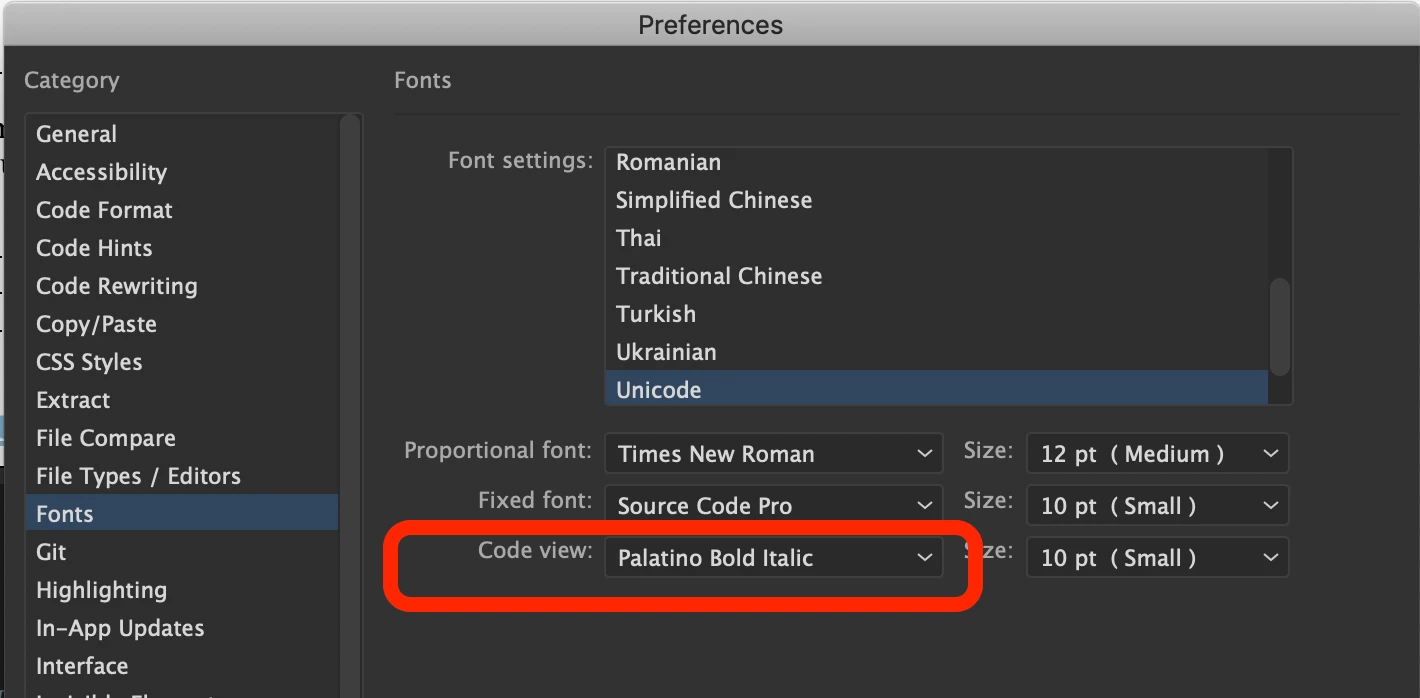
Here are the fonts that I was using : 


Changing the font does solve the issue depending on the font I choose. Thank you.

Nancy OShea
Community Expert
Community Expert
November 23, 2020

Switch to a different code theme.

Preferences > Interface > Code Theme...


Nancy O'Shea— Product User & Community Expert
Participant
November 23, 2020

I've tried that, like I said in the post. It only changes the background color, not the text (that stays black without color differenciation between tags and text). I also made sure my file was being recognised as the good type of code with the dropdown at the bottom of the window.

Nancy OShea
Community Expert
Community Expert
November 23, 2020

Submit a bug report from DW help menu.  Also, submit a bug report to Apple.

Revert to your previous OS if you can.


Nancy O'Shea— Product User & Community Expert
