

MarlinKnight
Known Participant
May 2, 2018
Answered

No Paste In DW

  • May 2, 2018
  • 1 reply
  • 400 views

Within a DW document, I block and copy some text that I want to move to another place in doc. DW will not allow drag and drop. I try paste. No dice. I try cut and paste. No go. I open Note Pad and the material pastes.

I recreate DW's cache. Doesn't help. I unload and reload DW. Didn't help. I restart my computer. I restart my DSL/WIFI router. DW still refuses to paste from the Windows Clip Board. I close DW again and reload. From the loading screen I notice that it just flew by the loading of the cache. Suspicious already.

But I open the doc I'm trying to modify, block and copy to the CB again, and then open a brand new, fresh HTML document. No paste.

I had this same trouble months ago. Forgot what I had to do. Mad as hell at DW. Can't find the info in the threads. Will somebody please tell me what to do and why the dickens DW goes off on these weird tangents in the first damn place.

    This topic has been closed for replies.
    Correct answer Nancy OShea

    Are you copying and pasting from Code, Design or Live view?

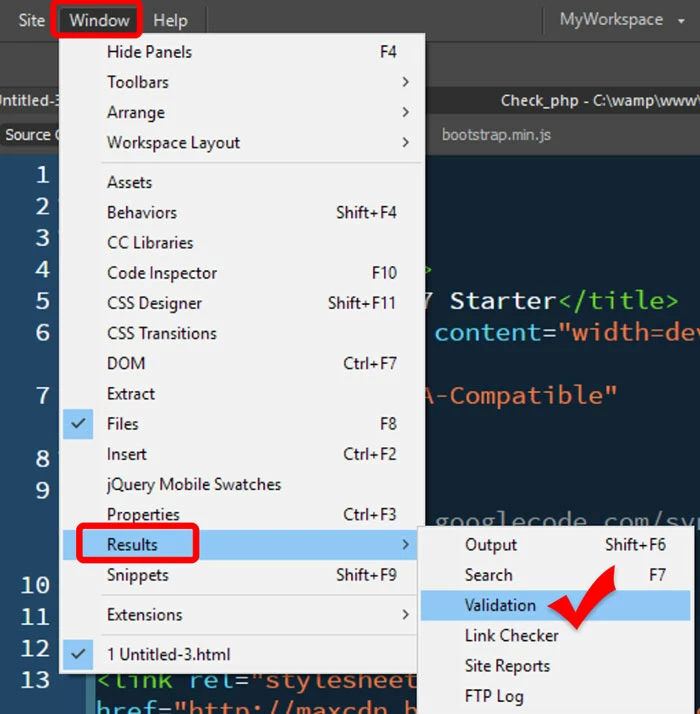
    Validate your document and fix reported code errors.

    If your code is free of errors and DW is still not responding, try Restore Preferences.

    Unusual behavior in Dreamweaver? Try restoring preferences.

    1 reply

    Nancy OShea
    Community Expert
    Nancy OSheaCommunity ExpertCorrect answer
    Community Expert
    May 2, 2018

    Are you copying and pasting from Code, Design or Live view?

    Validate your document and fix reported code errors.

    If your code is free of errors and DW is still not responding, try Restore Preferences.

    Unusual behavior in Dreamweaver? Try restoring preferences.

    Nancy O'Shea— Product User & Community Expert
    MarlinKnight
    Known Participant
    May 2, 2018

    Thanks, yes, it turned out to be the document and code errors.

    (I feel like an idiot...)

    Nancy OShea
    Community Expert
    Community Expert
    May 2, 2018

    MarlinKnight  wrote

    (I feel like an idiot...)

    Don't.  We've all been there .

    Nancy O'Shea— Product User & Community Expert